






A web designer is a creative and technical specialist who plans, designs, and optimizes website layouts to improve user experience, visual consistency, and conversion rates.
Finding the right web designer ensures your project runs smoothly and achieves its goals. Whether you're launching a new product, scaling agency work, or replacing a template site that no longer reflects your brand, working with a skilled designer saves time and prevents common pitfalls.
If you're ready to skip the trial and error, you can hire vetted LATAM web designers who’ve already been screened for the skills that matter.
Let’s explore costs, skills to evaluate, portfolio red flags, and where to actually find designers who deliver.
Why Hiring a Web Designer Matters for Growing Companies
A professional web designer turns a basic website into a functional, reliable tool for your business. Good design helps users navigate your site, ensures it works well on mobile devices, and supports SEO.
By integrating systems like CRMs or payment gateways, a designer allows your website to handle routine tasks efficiently, giving your team more time to focus on core operations.
Faster Execution for Agencies and Startups
Agencies juggling multiple client projects can't afford to wait weeks for landing pages. Startups racing to launch need someone who can turn wireframes into polished pages without endless revision cycles.
A dedicated web designer handles the visual execution so your team focuses on strategy. They take a rough concept, build out the landing page, and ship it while your developers work on backend functionality. That parallel workflow cuts project timelines significantly.
Professional Design That Converts
Templates look fine until you compare conversion rates. A professional designer understands how visual hierarchy guides users toward action. They know where to place CTAs, how much whitespace creates breathing room, and which color contrasts actually drive clicks.
Conversion rate optimization isn't guesswork. It's understood that a button below the fold performs differently than one placed after a value proposition. Good designers test these assumptions and adjust.
Technical & UX Expertise You Can't DIY
Wireframing looks simple until you try building one that actually guides development. Atomic design systems seem straightforward until your component library becomes a mess three months later.
Professional designers work in Figma with proper auto-layout, variant components, and design tokens. They create systems, not just pretty screens. That technical foundation saves hours during developer handoff and prevents the "that's not what I designed" conversations.
Why Founders Shouldn't Rely on Templates
Templates work for MVPs. They don't work when you're competing against companies with custom brand experiences.
The technical limitations show up fast: you can't customize the checkout flow, the mobile breakpoints create awkward layouts, and every tweak requires CSS overrides that break on the next update. Beyond technical debt, template sites signal "we're not serious enough to invest in our brand." Prospects notice.
When Hiring a Web Designer Has the Biggest Impact
Certain situations make professional design more important:
- Conversion rates dropped and you've ruled out traffic quality issues.
- You're rebranding and need visual consistency across all touchpoints.
- Client projects are stacking up faster than your current team can handle.
- You're launching a product and need landing pages that actually sell.
- Your current site looks like it was built in 2019 (because it was).
What a Web Designer Actually Does (Agency & Startup Context)
A web designer’s role varies between agencies and startups, but the goal is the same: combine usability with strong visuals. Agencies handle client projects and polished mockups, while startup designers shape the product, run user tests, and sometimes do light front-end or marketing work. Today, AI can speed up routine tasks, but strategy and UX decisions still require human judgment.
1. UX-Focused Layout and Wireframing
Web designers start with structure before aesthetics. They map out user flows, define content hierarchy, and create wireframes that show where each element lives and why.
Good wireframes answer questions: Where does the eye go first? What action should users take next? How do we guide someone from headline to CTA without losing them? This UX reasoning separates designers who make things pretty from designers who make things work.
2. Responsive Design Across Devices
Mobile-first is now standard. Designers start with the smallest screen and scale up, considering breakpoints, flexible grids, and differences between touch and mouse interactions. A button fine on desktop may be too small for thumbs, and a menu that works at 1440px can clutter a phone screen.
Key responsive considerations include: mobile-first CSS architecture, strategic breakpoint selection, touch-friendly interaction areas, and performance optimization for slower mobile connections.
3. Brand Consistency and Conversion Optimization
Every page needs to feel like it belongs to the same brand while pushing users toward specific actions.
Web designers maintain consistency through defined color palettes, typography systems, and spacing rules. They also know which pages need different treatments. A pricing page has different goals than a blog post. The homepage serves different users than a product comparison page.
CTA placement, visual hierarchy, and directional cues all influence whether someone clicks or bounces.
4. Collaboration with Developers and Marketers
Web designers don't work in isolation. They hand off files to developers, incorporate copy from marketers, and adjust based on analytics feedback.
Effective collaboration means organized Figma files with clear naming conventions, exported assets in correct formats, design specifications that developers can actually implement, and flexibility when technical constraints require adjustments.
What to Evaluate Before You Hire a Web Designer
Before starting your search, clarify what you actually need. Run through this checklist:
- UX thinking: Can they explain why elements are placed where they are?
- Typography skills: Do their font pairings and sizing create clear hierarchy?
- Figma proficiency: Are their files organized or a maze of unnamed layers?
- Responsive logic: Do mobile designs feel intentional or like afterthoughts?
- Conversion-first reasoning: Can they point to design decisions that drove results?
You can explore LATAM UI/UX talent to see what strong portfolios look like.
U.S. vs LATAM: What Type of Web Designer Should You Hire?

Choosing between U.S. and LATAM web designers is a choice between local insight and cost efficiency. U.S. designers work well for projects needing market-specific knowledge or close collaboration. LATAM designers, in countries like Mexico, Argentina, and Colombia, offer 40-70% savings and align with U.S. time zones, making real-time teamwork easier.
1. Skill Parity: How LATAM Designers Match U.S. Quality
The assumption that offshore means lower quality stopped being true years ago. LATAM designers train on the same resources, use identical tools, and often have agency experience serving U.S. and European clients.
What you'll find with vetted LATAM talent: strong English communication, Figma expertise comparable to U.S. designers, UX training from reputable programs, and portfolio work for recognizable brands.
The difference isn't skill level. It's cost of living, which translates to lower rates without sacrificing quality.
2. Cost Differences: U.S. vs LATAM Talent
LATAM web designers cost significantly less than U.S. designers across all experience levels, with monthly savings ranging roughly $3,000–$5,400. The gap is largest for junior roles, but mid-level and senior positions also offer substantial cost advantages.
These numbers represent full-time positions. Freelance rates add variability but follow similar regional patterns.
3. Communication, English Level & Time Zones
Time zone alignment makes nearshore hiring practical in ways offshore hiring from Asia often isn’t. LATAM designers typically work within 1–3 hours of U.S. Eastern time, allowing same-day feedback, real-time collaboration in Figma, and meetings at reasonable hours.
English proficiency varies by individual, but vetted candidates from talent partners have already passed communication screening, ensuring they can explain their design decisions clearly.
4. Why Nearshore Hiring Is Rising in 2026
Companies are moving from offshore models to nearshore teams for real-time collaboration. LATAM hubs offer a “time-zone advantage,” enabling same-day feedback and faster decision-making.
Key benefits include:
- 30–50% lower labor costs compared with U.S. salaries.
- Fewer visa-related challenges, like the $100,000 H-1B fee.
- Faster delivery using AI tools and specialized workflows.
- The ability to scale design and engineering capacity efficiently while maintaining quality.
Nearshore teams give growing companies local-like agility without the higher costs of domestic hiring.
Which Type of Web Designer Should You Hire Based on Budget and Goals
Your hiring decision depends on project scope, budget, and long-term needs.
Choose U.S. in-house when you need someone embedded in company culture for strategic brand work. Choose LATAM full-time when you want dedicated talent at lower cost for ongoing projects. Choose freelance when projects are one-off or you're testing before committing. Choose agency when you need multiple skill sets bundled and managed externally.
When Should You Hire a Web Designer?
You should hire a web designer when your site starts slowing growth or failing to support your goals. Signs include high bounce rates, declining conversions, poor mobile responsiveness, or a DIY layout that doesn’t inspire trust. It’s also time to hire when scaling products, integrating tools like CRMs or payment gateways, or adding AI-driven personalization that templates can’t handle.
When Templates Hurt Your Brand
Templates can only take you so far. If every tweak requires custom code, spacing feels off, mobile layouts break, or competitors’ sites look cleaner, it’s time for a designer who can build without constraints.
When You Need Higher Conversion Rates
Even with steady traffic, low conversions often point to design issues. A/B tests show that visual changes - button placement, form layout, images, or whitespace - can move metrics more than copy. A designer familiar with CRO can identify and fix these bottlenecks.
When Your Website No Longer Represents Your Business
Companies evolve faster than websites. You've added services, shifted positioning, or grown into new markets. But your site still reflects who you were two years ago.
This misalignment confuses prospects and undermines credibility. When someone visits your site and it doesn't match the company they've heard about, trust erodes before you can recover it.
When You're Scaling Client Projects
Agencies hit a point where project volume exceeds design capacity. You're either turning down work, missing deadlines, or burning out your current designers.
Adding dedicated design capacity through full-time nearshore designers for hire lets you scale without the overhead of additional U.S. salaries.
Common Triggers That Signal It's Time to Hire a Web Designer
If any of these sound familiar, it's probably time:
- Design revisions are becoming the bottleneck in project delivery.
- You're losing deals partly because competitors' sites look more professional.
- Your dev team is doing design work they shouldn't be doing.
- You postponed the rebrand because "we don't have design bandwidth".
- Mobile users are bouncing at higher rates than desktop.
How to Hire the Right Web Designer (Step-by-Step Guide)
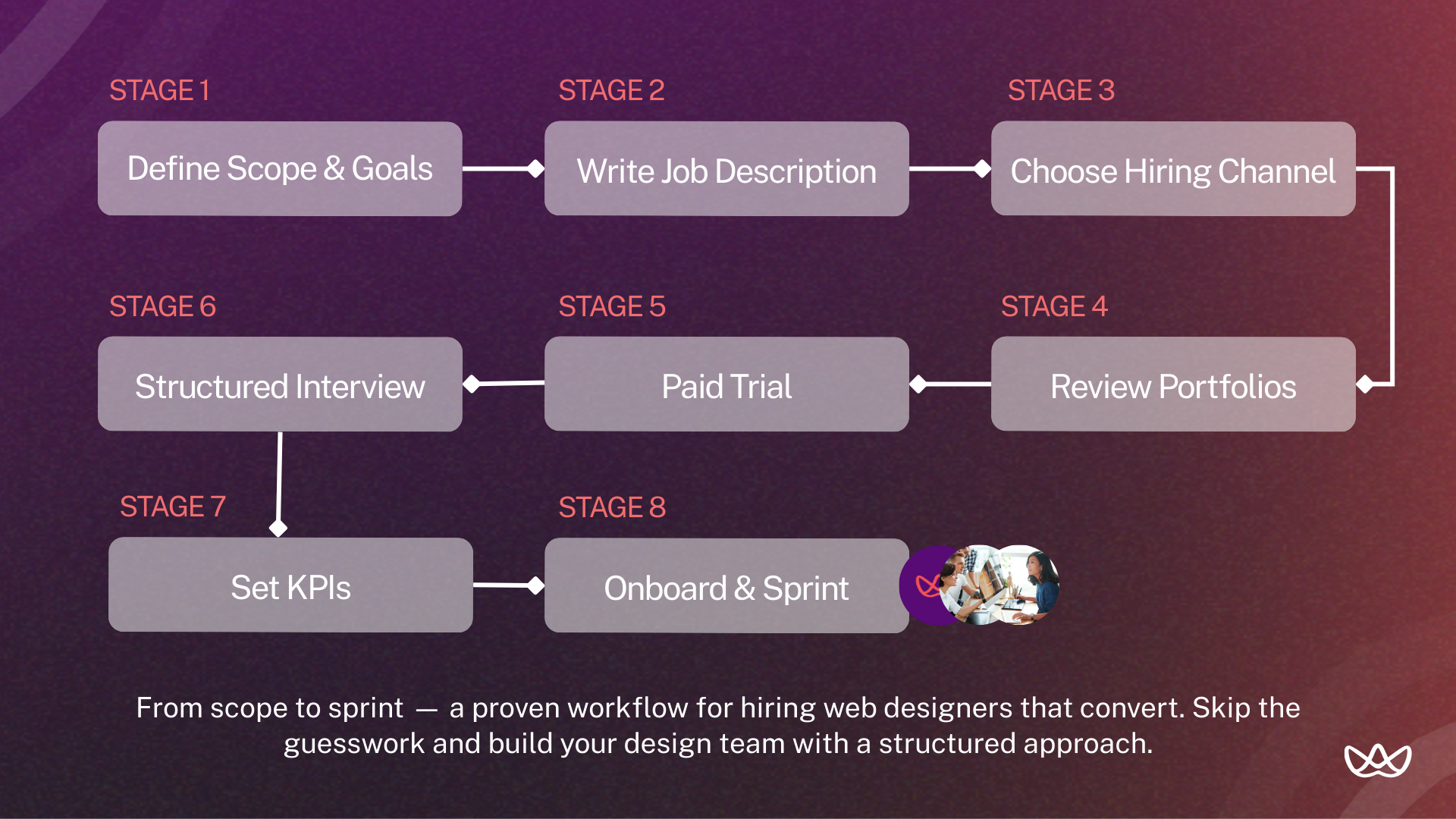
To hire the right web designer, focus on specific business goals like boosting conversions or integrating a CRM. Check portfolios on platforms like Dribbble or Behance, prioritizing measurable results over just visuals. Assess communication skills and knowledge of accessibility standards, and always run a paid trial project to see their workflow and technical ability in action.
Step 1: Define Scope, Goals & Deliverables
Start by clarifying exactly what you need. Vague requirements lead to misaligned expectations.
Define your deliverables explicitly: landing pages (how many?), website redesign (which pages?), ongoing design support (hours per week?), or design system creation (what components?).
Set measurable goals. "Better design" isn't a goal. "Increase homepage conversion rate from 2.1% to 3.5%" is a goal you can evaluate against.
Step 2: Create a Role-Specific Job Description
Generic job descriptions attract generic applicants. Be specific about tools (Figma, Webflow, specific CMS platforms), deliverables (responsive web pages, not mobile apps), and collaboration expectations (async communication, weekly syncs).
Include information about your design process, the types of projects they'll work on, and how success gets measured.
Step 3: Choose Your Hiring Channel (Freelance, Full-Time, LATAM, Agency)
Freelance offers flexibility for short-term projects but varies in quality. U.S. full-time hires provide oversight and alignment at higher cost. LATAM full-time designers balance cost and time-zone collaboration, while agencies handle complex projects with managed delivery at a premium.
Step 4: Review Portfolios for Strategy, Not Just Aesthetics
Strong-looking portfolios don’t guarantee effective design. Look deeper.
What to look for:
- Case studies that explain reasoning, not just show screenshots.
- Before/after examples with context on business goals.
- Variety that shows adaptability across industries or project types.
- Mobile versions included, not just desktop mockups.
- Evidence of conversion thinking: CTA placement, user flow logic.
Red flags:
- Only showing concept work with no shipped projects.
- No explanation of constraints or challenges faced.
- Every project looks identical in style (template approach).
- Missing mobile or responsive examples.
- Unable to explain why specific design decisions were made.
Conversion-focused signals:
- Mentions of A/B testing or performance metrics.
- Designs that show clear visual hierarchy toward CTAs.
- Understanding of user psychology in design choices.
Step 5: Test Technical & UX Skills with a Paid Trial
Portfolios show what a designer has done. A paid trial shows how they work with your team.
Give a small, realistic task, such as redesigning a section of a landing page, creating a component library, or addressing a specific UX problem.
Pay for the trial. Look at file organization, responsiveness, problem-solving approach, communication, and how they handle feedback.
Step 6: Run a Structured Interview (Creative + Technical)
Mix creative questions with technical assessment:
Creative questions:
- Walk me through a project where the first design didn't work. What did you change and why?
- How do you approach a redesign when the client's brand guidelines are outdated?
- Describe how you'd prioritize elements on a landing page for a product launch.
Technical questions:
- How do you organize components in Figma for developer handoff?
- What's your process for creating responsive designs?
- How do you handle a design that looks great but developers say is hard to build?
- What's your approach to designing for accessibility?
Collaboration questions:
- How do you handle feedback you disagree with?
- Describe your ideal design review process.
- How do you communicate with developers during implementation?
Step 7: Onboard with Clear KPIs
Define success metrics before day one. What will you measure at 30, 60, and 90 days?
Examples: number of pages delivered, revision rounds required, stakeholder satisfaction scores, adherence to timelines, or conversion improvements on redesigned pages.
Clear KPIs prevent the "I thought they were doing great" / "I thought you were unhappy" disconnect three months later.
Step 8: Onboard Efficiently - Brand Guidelines, Access & First Sprint Setup
Focus on speed and onboarding so they can start contributing right away.
Onboarding checklist:
- Brand guidelines and design system documentation shared.
- Figma workspace access configured with correct permissions.
- Access to existing website analytics for context.
- Introduction to key stakeholders and their roles.
- First project briefed with clear deliverables and timeline.
- Communication channels established (Slack, email expectations).
- Feedback process explained.
Set up a first sprint with a defined deliverable. Nothing builds momentum like shipping something in the first two weeks.
What to Look for in a Web Designer
Look for a designer who combines visual storytelling with technical performance. Beyond a polished portfolio, verify UX expertise, conversion-focused results, and proficiency with tools like Figma.
They should understand SEO and AI-friendly site structure, accessibility standards, and act as a strategist, turning business goals into scalable, personalized user experiences rather than static layouts.
1. Visual Design Skills (UI)
A good UI designer creates interfaces that look clean and work well, using color, typography, spacing, and hierarchy.
Why it matters: Users form an opinion about your site within seconds. The right visual design builds credibility immediately.
How to evaluate: Review portfolios for consistent systems, intentional color choices, and clear hierarchy. Ask them to critique a live website’s design.
2. UX Thinking and Problem-Solving
UX means designing flows that help users reach their goals without friction.
Why it matters: Even visually nice sites fail if users get confused. Strong UX ensures design supports your business objectives.
How to evaluate: Ask them to explain their process for a complex page, including research, flow mapping, and iteration based on feedback.
3. Responsive and Mobile-First Execution
Design should work on any screen, starting with mobile.
Why it matters: Most visitors use mobile devices. Poor mobile experiences increase bounce rates and hurt conversions.
How to evaluate: Check portfolios for mobile versions. Ask how they handle breakpoints and elements that don’t scale easily.
4. Experience with CMS and No-Code Tools
They should know platforms like Webflow, WordPress, Shopify, or Framer.
Why it matters: Understanding CMS limits means designs can actually be built, reducing revisions and development time.
How to evaluate: Ask which platforms they’ve worked with and how CMS constraints influenced their designs.
5. Clear Communication & English Fluency (for remote teams)
A designer needs to explain decisions clearly, take feedback, and collaborate across time zones.
Why it matters: Miscommunication slows projects. Clear explanations and understanding feedback keep workflows smooth.
How to evaluate: Do a video interview, asking them to explain a complex design choice. Focus on clarity, not accent.
Must-Have Skills When You Hire a Web Designer
When hiring a web designer, focus on core skills that directly impact usability, conversion, and implementation. Visual design, UX, essential tools, technical capabilities, and communication are must-haves, while additional skills like motion design, advanced research, or client management are nice-to-have extras.
Best Places to Hire Web Designers in 2026
1. Vetted Talent Partners (Floowi - Pre-screened LATAM Designers)
Vetted talent partners pre-screen designers for skills, English proficiency, and cultural fit, so you only see candidates who meet your standards. This reduces the risk of mismatches and can make hiring faster than sourcing directly.
While it may cost more upfront than direct hiring, it often saves time and resources. You can hire vetted LATAM web designers through Floowi, connecting with qualified UI/UX and web design talent efficiently.
2. Freelance Marketplaces
Platforms like Upwork, Fiverr, and 99designs offer large talent pools at various price points, but quality can vary, so vetting is your responsibility.
Pros: Flexible engagement, budget options, client reviews.
Cons: Screening takes time, quality is inconsistent, requires management.
Best for: One-off projects, testing before a long-term hire, or startups on a budget.
3. Portfolio Platforms
Platforms such as Dribbble and Behance let designers showcase their best work. You can search by style, industry, or skill and reach out directly.
Pros: High-quality visual portfolios, easy to filter for aesthetic fit.
Cons: Often shows concept work rather than shipped products, outreach response can vary.
Best for: Finding designers whose visual style matches your brand or sourcing specific aesthetics.
4. Direct Hiring Channels
LinkedIn and remote job boards like We Work Remotely, Remote OK, or AngelList let you reach candidates actively seeking roles.
Pros: Direct access, no platform fees, candidates are actively looking.
Cons: No vetting provided, can be a high volume of applications to review.
Best for: Companies with established hiring processes and HR capacity.
Your Next Move
The best web designers focus on results, not just visuals. Look beyond portfolios - ask about problems solved, constraints managed, and measurable outcomes. Effectiveness drives business value.
Nearshore designers, particularly from LATAM, deliver U.S.-level skills at lower cost with time zone alignment, letting you scale projects, iterations, and pages efficiently.
Key Takeaways:
- Hire when templates, conversions, or your site no longer meet business needs.
- Evaluate portfolios for strategy and conversion impact, not just aesthetics.
- LATAM designers offer strong skills at 40-50% lower cost with real-time collaboration.
- Use paid trials to test technical and UX abilities.
- Define clear KPIs during onboarding.
- Select hiring channels based on scope and budget.
Start hiring a web designer with vetted LATAM talent through Floowi. Book your free consultation today.
Frequently Asked Questions
How do I hire a web designer the right way?
Start by defining your specific needs and deliverables. Choose a hiring channel that matches your budget and timeline. Review portfolios for strategic thinking, not just visual appeal. Run a paid trial to evaluate actual working style. Onboard with clear KPIs so both parties understand what success looks like.
How do web designers improve conversion rates compared to template-based sites?
Custom designers optimize for your specific user journey. They place CTAs based on visual hierarchy principles, design forms that reduce friction, and create layouts that guide attention toward conversion points. Templates are generic by definition. Custom design is strategic.
What's the ROI of hiring a professional designer vs. DIY?
A 1% conversion rate improvement on a site with 10,000 monthly visitors and a $100 average order value equals $10,000 in additional monthly revenue. That's $120,000 annually. Compare that against designer salary and the math becomes clear quickly.
How do LATAM designers match U.S. quality standards?
They train on identical resources, use the same tools, and often have experience serving U.S. clients through agencies. The quality difference between vetted LATAM and U.S. designers is negligible. The cost difference is significant.
What's the cost difference between U.S. and LATAM designers?
Senior designers in the U.S. earn $95,000-$130,000 annually. Equivalent LATAM talent costs $42,000-$65,000. That's roughly 40-50% savings without sacrificing skill level.
What portfolio signals show strategic thinking beyond aesthetics?
Look for case studies that explain the "why" behind design decisions. Evidence of iteration based on feedback or data. Before/after comparisons with context. Mention of business goals, not just visual goals.
How do paid trials validate technical and UX skills?
Trials reveal what portfolios hide: file organization, responsiveness to feedback, problem-solving approach, communication style, and how designs hold up under real constraints.
What's the best way to evaluate conversion-focused design skills?
Ask candidates to critique a live landing page. Listen for observations about CTA placement, visual hierarchy, form design, and user flow. Strong candidates spot opportunities others miss.
How long does a typical website redesign take?
Small sites (5-10 pages) take 4-8 weeks. Medium sites (10-30 pages) take 8-16 weeks. Large sites or complex redesigns take 4-6 months. These timelines assume design only, not development.
Where is the best place to hire a web designer?
The best place to hire a web designer depends on your needs: use vetted talent partners like Floowi for nearshore LATAM top talent and reliable full-time hires, freelance marketplaces like Upwork for project-based work, or portfolio sites like Dribbble to find designers whose style matches your brand.




