


.png)



A web designer for hire is a professional you engage to plan, design, and build website layouts that drive conversions and reflect your brand. Companies typically hire web designers through freelance platforms, agencies, or vetted talent partners like Floowi that specialize in pre-screened LATAM designers.
Finding the right web designer for hire takes more than browsing portfolios. You need someone who understands conversion principles, works well with your dev team, and delivers on deadline.
Let’s cover what to look for, how to evaluate portfolios, compare hiring models, and understand current cost ranges so you can hire with confidence.
Why Hire a Web Designer?
Hiring a professional web designer ensures your site drives results, not just looks good. They create customized layouts that strengthen brand credibility, optimize UX and mobile responsiveness, and improve conversions.
Designers integrate SEO best practices and modern technologies, ensuring fast load times, strong search visibility, and secure, maintainable sites.
What Does a Web Designer Do?
Web designers handle the visual and functional elements of your website. Their work spans multiple disciplines:
- UI design: Crafting interfaces with color, typography, and spacing.
- UX thinking: Designing smooth, intuitive user flows.
- Responsive design: Ensuring layouts work on desktop, tablet, and mobile.
- CMS setup: Configuring and customizing platforms like WordPress or Webflow.
- Conversion-focused layouts: Optimizing placement of CTAs, forms, and content.
- Developer collaboration: Providing specs and assets ready for development.
- Brand consistency: Keeping visuals coherent across all pages.
The scope varies by project. Some designers focus purely on visual design while others handle light frontend work. Clarify expectations before you hire.
Benefits of Engaging a Professional Web Designer
Hiring a professional designer delivers real advantages:
- Faster execution: They handle page builds while your team focuses on strategy.
- Higher conversions: Smart layouts and well-placed CTAs improve results.
- Better branding: Consistent visuals build trust and recognition with your audience.
- Easier scalability: Design systems let you update and expand without issues.
- Reliable performance: Sites run smoothly across devices and browsers.
Templates can help you get started, but they usually hit their limits fast. A professional designer builds with flexibility in mind, so your site can grow and adapt as your business needs change.
Who Should Hire a Web Designer? (Use Cases)
Agencies with tight client schedules, startups pushing to launch, and founders limited by templates all run into situations where a web designer becomes essential.
1. Agencies Scaling Client Projects
Agencies managing multiple accounts need design capacity that scales with demand. When client work stacks up, you're either turning down projects, missing deadlines, or burning out your current team.
A dedicated web designer for hire handles landing pages, full site redesigns, and ongoing client maintenance. They work within your systems and brand guidelines so output stays consistent across accounts.
2. Startups Needing Fast Execution
Product launches move fast. You need landing pages, feature announcements, and marketing sites that ship in days rather than weeks.
Startups benefit from designers who can take rough wireframes and turn them into polished pages without endless revision cycles. Speed matters when you're racing to validate ideas or capture market timing.
3. Founders Replacing Low-Converting Templates
Your Squarespace or WordPress template worked for an MVP, but it quickly reaches its limits. Mobile layouts break, checkout flows stay rigid, and every change forces CSS fixes that don’t hold. A professional web designer fixes these issues from the start, creating a site that improves conversions and scales as your business grows.
When Should You Hire a Web Designer?
Hire a web designer when your site struggles with performance, modern features, mobile usability, or compliance requirements. Bringing in a professional early helps avoid technical issues and keeps your site reliable and credible.
Signs You Need Help
These signals indicate it's time to bring in professional design help:
- Slow load times that hurt both UX and SEO rankings.
- Poor mobile experience causing high bounce rates on phone traffic.
- Conversion rates stuck despite optimizing copy and offers.
- Brand inconsistency across pages making your site feel disjointed.
- Dev team doing design work they shouldn't be doing.
- Design revisions becoming the bottleneck in project delivery.
If three or more of these apply, you're probably overdue for dedicated design capacity.
Internal vs Outsourced Design - What Works Best?
Internal teams work best for companies with steady, high-volume design needs and budgets for full U.S. salaries. Outsourcing works well when you need flexibility, specialized skills, or a more cost-efficient solution.
What to Look for When Hiring a Web Designer
When hiring a web designer, look for a portfolio with relevant experience and results. Check technical skills, communication, and understanding of your brand. Make sure the quote covers post-launch support, security, and ownership of assets.
Technical Skills: HTML, CSS, CMS, Responsive Design
Every web designer for hire should have solid skills in:
- HTML/CSS literacy: Know enough markup to create layouts developers can build.
- CMS experience: Familiar with platforms like WordPress, Webflow, or Shopify.
- Responsive design: Mobile-first layouts with clear breakpoints.
- Figma skills: Well-organized files, components, and proper naming
- Performance awareness: Design with load times and efficiency in mind.
Ask candidates which CMS platforms they’ve worked on and how technical limits shaped their decisions.
Creative & Soft Skills: UX, Communication, Process
Technical skills handle the work, while soft skills shape how smoothly the team works together.
- UX reasoning: Can they explain why elements are placed where they are?
- Clear communication: Do they articulate design decisions without jargon?
- Feedback handling: How do they respond when stakeholders push back?
- Process transparency: Can they walk you through their typical workflow?
- Deadline reliability: Do they have a track record of shipping on time?
These matter more for remote collaboration where you can't tap someone on the shoulder.
Portfolio, Case Studies & Industry Experience
Strong portfolios go beyond finished designs. Look for work that shows the designer’s approach, decisions, and the results achieved.
- Case studies with context: What was the business problem?
- Before/after examples: Evidence of improvement, not just final designs
- Shipped work: Real projects that went live, not just concepts
- Industry variety: Adaptability across different sectors and project types
- Mobile examples: Responsive designs shown on multiple screen sizes
Red flags include portfolios with only concept work, identical styling across every project, or inability to explain the reasoning behind decisions.
How to Evaluate UX Thinking in a Designer's Portfolio
UX thinking means the designer considers how users interact with the interface, not just how it looks.
Why it matters: Pretty designs that confuse users don't convert. You need someone who designs for user goals, not just aesthetics.
How to evaluate: Ask the designer to walk through a portfolio project and explain:
- Why did you place the CTA there?
- How did you prioritize content hierarchy?
- What user problems were you solving?
- How did you handle feedback that changed your initial approach?
Strong candidates answer with specific reasoning. Weak candidates describe only visual choices.
Freelance vs. Agency: Which to Choose?
Choose a freelancer if you have a limited budget, a defined project, and want direct access to a specialized expert. Go with an agency if you need a full team for complex work like custom development, marketing, or ongoing support. Freelancers offer flexibility; agencies offer scale and stability.
Pros & Cons of Freelancers
Freelancers are best for focused projects, smaller budgets, and direct collaboration with a specialist.
Pros & Cons of Agencies
Agencies are best for complex, multi-discipline projects that need scale and backup resources.
Freelance vs Full-Time vs Nearshore: Which Option Works Best?
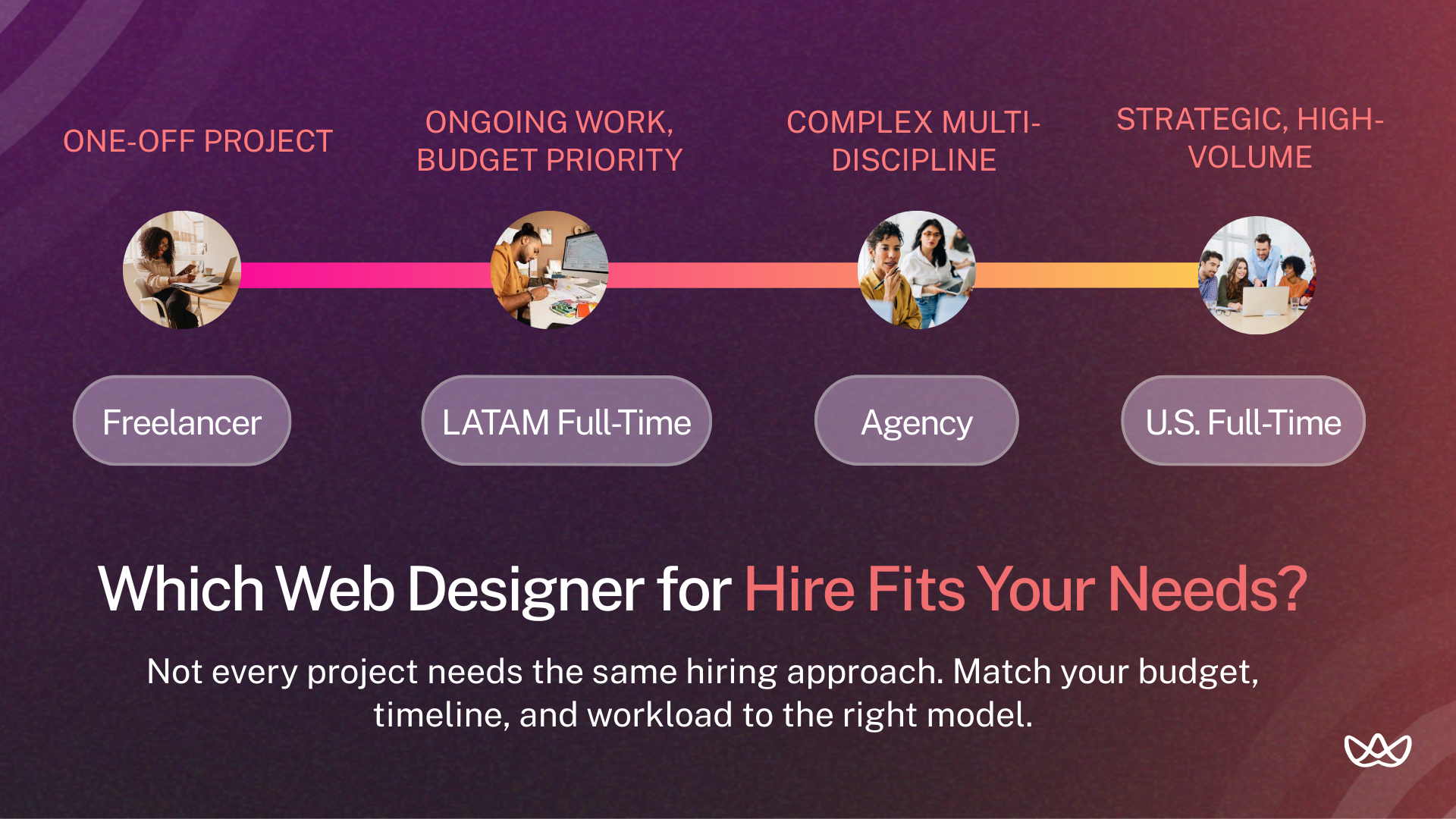
Choose a freelancer for flexible, cost-effective projects, a full-time designer for ongoing brand integration and high-volume work, or a nearshore team to scale quickly with lower costs and real-time collaboration. Freelancers offer flexibility, full-time hires ensure consistency, and nearshore teams balance talent and budget.
Freelancers: Flexibility & Speed
Freelancers work well for one-off projects, overflow work, or testing before committing to a longer engagement. You pay only for what you need and can scale quickly.
The downside: inconsistent availability, variable quality, and managing all coordination yourself. Good freelancers are often booked weeks in advance.
Full-Time Designers: Long-Term Consistency
Full-time hires make sense when you have consistent, ongoing design needs. They learn your brand deeply, integrate with your culture, and are always available.
The downside: U.S. salaries run $70,000-$130,000 plus benefits. That's a significant fixed cost whether project volume is high or low.
Nearshore LATAM Designers: Quality & Cost Efficiency
LATAM designers offer a middle path: dedicated full-time capacity at 40-50% lower cost than U.S. hires. Time zone overlap (1-3 hours from U.S. Eastern) enables real-time collaboration that offshore hiring from Asia can't match.
Vetted LATAM talent brings U.S.-level skills because they train on identical resources, use the same tools, and often have experience serving American clients. The cost difference comes from lower cost of living, not lower quality.
Step-by-Step Guide to Hiring a Web Designer
To hire a web designer in 2026, follow this streamlined five-step process:
1. Define Your Project Scope and Goals
Start with clarity on what you actually need:
- Number of pages or screens
- New design or redesign of existing site
- One-time project or ongoing support
- Specific platforms (Webflow, WordPress, Shopify)
- Timeline and launch date
- Success metrics (conversion rate, load time, etc.)
Vague requirements lead to misaligned expectations. "Make it look better" isn't a brief. "Increase homepage conversion from 2.1% to 3.5% through improved visual hierarchy and CTA placement" is a brief.
2. Write the Right Job Description
Your job description should specify:
- Tools required (Figma, specific CMS platforms)
- Deliverable types (responsive web pages, not mobile apps)
- Collaboration expectations (async communication, weekly syncs)
- Portfolio requirements (shipped work, case studies)
- How you'll evaluate candidates (trial task, interview process)
Generic descriptions attract generic applicants. Be specific about what success looks like.
3. Where to Find Web Designers (Platforms & Communities)
Multiple channels exist for finding a web designer for hire:
- Vetted talent partners like Floowi (pre-screened candidates, faster hiring).
- Freelance marketplaces (Upwork, Fiverr, Toptal).
- Portfolio platforms (Dribbble, Behance).
- Job boards (LinkedIn, We Work Remotely, AngelList).
- Design communities (Slack groups, Twitter/X design circles).
Each channel comes with different considerations in cost, quality, and time investment.
Vetted LATAM Designers (Floowi)
Talent partners handle vetting so you don't screen hundreds of applicants. Floowi pre-screens LATAM designers for technical skills, English proficiency, and collaboration readiness before you see a single candidate.
The advantage: faster hiring, lower risk, and candidates who've proven they can deliver. You can find vetted Latin American web designers matched to your specific requirements.
4. Shortlist, Interview & Test Candidates
Portfolio review questions:
- Walk me through a project where the first approach didn't work
- How did business goals shape your design decisions?
- Show me how you organized this Figma file
Technical assessment:
- How do you approach responsive design?
- What's your process for developer handoff?
- How do you handle designs that developers say are hard to build?
Paid trial task: Design a small, realistic deliverable: redesign a landing page section, create a component library, or solve a real UX problem. Pay for the trial. Evaluate file organization, responsiveness to feedback, and communication during the process.
5. Finalize the Hire, Set Clear Deliverables & Terms
Before starting work, align on:
- Specific deliverables and acceptance criteria.
- Payment terms and schedule.
- Revision limits and change request process.
- Communication cadence and channels.
- Ownership of design files and assets.
- Timeline with milestones.
Written agreements prevent the "I thought we agreed on something different" conversations later.
Web Designer Vetting Checklist
Use this checklist when evaluating any web designer for hire:
How Much Does It Cost to Hire a Web Designer?
Web designer costs vary widely based on location, project scope, and engagement type, so it’s important to match your budget to your needs and the level of expertise required.
Hourly rates:
- U.S. designers: $75-$150/hour
- LATAM designers: $25-$60/hour
- Freelance platforms: $30-$100/hour (wide range)
Fixed project pricing:
- Landing page: $500-$3,000
- Full website (5-10 pages): $3,000-$15,000
- E-commerce site: $5,000-$25,000+
- Design system creation: $5,000-$20,000
Fixed pricing works for defined scopes. Hourly works better for ongoing support or projects with unclear scope.
Factors That Affect Cost: Complexity, Location, Experience
Cost varies based on:
- Project complexity: Simple landing page vs. complex web application.
- Designer location: U.S. vs. LATAM vs. Asia (cost of living differences).
- Experience level: Junior (0-2 years) vs. senior (5+ years).
- Timeline: Rush projects command premium rates.
- Specialization: E-commerce, SaaS, or industry-specific expertise.
- Engagement type: One-off project vs. ongoing retainer.
What Are the 5 Golden Rules of Web Design?
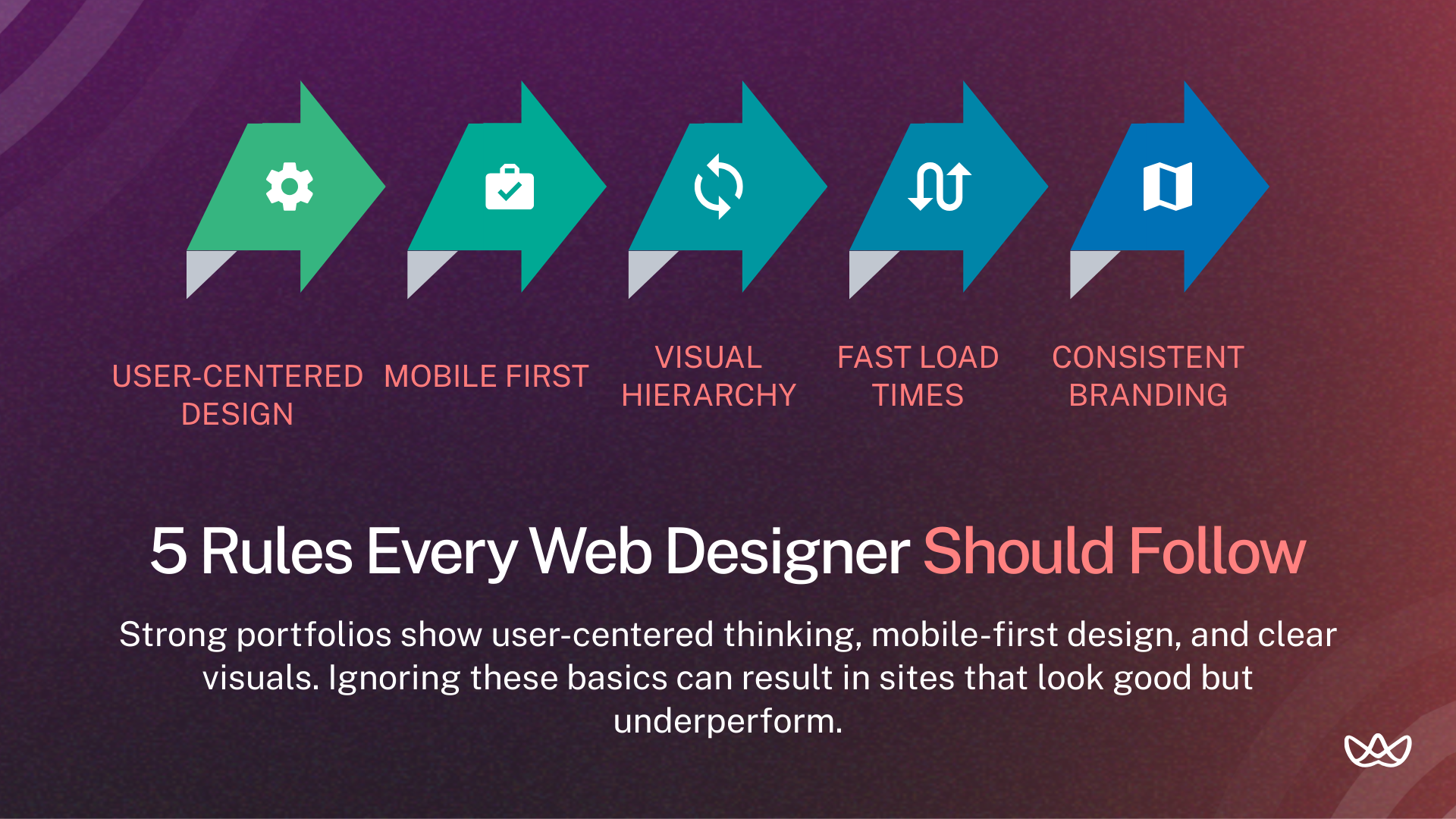
When evaluating designers, check if their work follows these principles:
Rule 1: User-Centered Design
Every design decision should serve user goals. Navigation should be intuitive. Content should answer visitor questions. Forms should minimize friction. Ask candidates how they research and incorporate user needs.
Rule 2: Mobile First & Responsive
Over half of web traffic comes from mobile devices. Designs should start with the smallest screen and expand, not the other way around. Check that portfolio work includes thoughtful mobile versions, not just shrunk-down desktop layouts.
Rule 3: Clear Visual Hierarchy
Users should know where to look first, second, and third. Headlines, CTAs, and key information need proper emphasis through size, color, and spacing. Strong designers create hierarchy that guides users toward action.
Rule 4: Fast Loading Times
Design choices impact performance. Oversized images, heavy animations, and complex layouts slow load times. Good designers balance visual impact with technical efficiency. Ask how they approach performance in their design process.
Rule 5: Consistent Branding & Accessibility
Colors, typography, and spacing should feel cohesive across every page. Accessibility matters too: proper contrast ratios, readable fonts, and designs that work for users with disabilities. These aren't extras. They're baseline requirements.
Top Places to Find a Web Designer for Hire
You can find web designers through vetted LATAM talent, freelance platforms, portfolio sites, or direct hiring channels. Each option differs in speed, cost, and reliability, so choose based on your project needs and how much screening you want to handle.
1. Floowi - Pre-Vetted LATAM Web Designers
Vetted talent partners eliminate the screening burden. Floowi pre-screens designers for technical skills, English fluency, and remote collaboration readiness. You get candidates matched to your requirements in under 15 days.
2. Freelance Platforms (Upwork, Fiverr)
These platforms offer a wide range of designers at different rates. Quality varies, so expect to review several profiles and run interviews. Reviews can be helpful, but they don’t always tell the full story. This route works best for smaller projects or short trial engagements.
3. Portfolio Sites (Dribbble, Behance)
Designers use these platforms to share selected work. You can search by style, industry, or tools and contact designers directly. Keep in mind that many portfolios highlight concept work, not always live projects. Response rates from outreach can be inconsistent.
4. Direct Hiring Channels (LinkedIn, Remote Boards)
LinkedIn supports targeted searches by role, skill set, and location. Remote job boards like We Work Remotely and AngelList attract designers actively looking for roles. You avoid platform fees, but you’ll need time to sort through a higher volume of applicants.
Your Next Move
Hiring a web designer works best when you lead with clear requirements and a consistent evaluation process. Focus on real work, UX reasoning, and communication quality rather than visuals alone. For many teams, nearshore LATAM designers offer a practical balance of skill, cost control, and time zone alignment, especially when sourced through vetted talent partners.
Key Takeaways
- Hire when templates or UX limit growth
- Review shipped work, not visuals only
- LATAM designers balance cost and quality
- Validate skills with paid trials
- Set scope and success metrics upfront
If you need a web designer for hire without long screening cycles, Floowi connects you with pre-vetted LATAM designers ready to work in your time zone. Book your free consultation today.
Frequently Asked Questions
How do web designers influence conversion rates compared to DIY templates?
Custom designers optimize for your specific user journey. They place CTAs based on visual hierarchy principles and design forms that reduce friction. Templates are generic by definition. Custom design is strategic and tailored to your conversion goals.
What's the importance of responsive, mobile-first design in 2026?
Mobile traffic exceeds desktop for most websites. Poor mobile experiences directly cause high bounce rates and lost conversions. Designers who build mobile-first create better experiences across all devices.
How do agencies evaluate UX thinking in portfolios?
Look for case studies that explain reasoning, not just show screenshots. Ask candidates to walk through decisions: why that CTA placement, how they prioritized content, what user problems they solved. Strong UX thinkers answer with specifics.
What portfolio red flags should hiring managers watch for?
Watch for: only concept work with no shipped projects, identical styling across every project, missing mobile or responsive examples, no explanation of constraints or challenges, and inability to discuss the reasoning behind design decisions.
How do agencies evaluate nearshore LATAM talent?
Screen for English proficiency through video interviews. Review portfolios for U.S. or European client work. Use paid trials to assess communication and collaboration style. Vetted talent partners like Floowi handle this screening upfront.
How do agencies define scope and deliverables before hiring?
Specify: number of pages, new design vs. redesign, platform requirements, timeline, success metrics, and revision limits. Written briefs prevent misalignment. "Make it better" isn't scope. Measurable goals are scope.
What's the role of paid trials in validating skills and collaboration?
Trials reveal what portfolios hide: file organization, communication style, response to feedback, and actual working pace. Always pay for trials. Unpaid work attracts candidates who aren't in demand elsewhere.
How do U.S. rates compare to LATAM rates?
Senior U.S. designers earn $95,000-$130,000 annually. Equivalent LATAM talent costs $42,000-$65,000. That's roughly 40-50% savings with comparable skill levels. The difference comes from cost of living, not quality.




