


.png)



If website work keeps backing up, the issue is usually capacity rather than strategy. Local hiring takes time, costs more than most teams want to spend, and rarely scales when demand spikes, while freelancers often struggle with consistency once projects grow.
That is why many companies now hire a remote web designer. You can scale design output faster, control costs, and hire based on skill instead of geography, without committing to long local hiring cycles.
A remote web designer is a full-time or contract designer who works remotely, collaborates online, and delivers UX-focused web design without geographic limitations.
Let’s break down how to hire a remote web designer, from where to find reliable talent to what it costs in 2026 and how teams hire vetted LATAM remote web designers in under 15 days through pre-screened partners like Floowi.
Why Hire a Remote Web Designer?
Hiring a remote web designer in 2026 gives you access to specialized talent at lower cost, with faster, focused work and expertise in mobile-first design, SEO, and site performance.
1. Cost Savings vs. U.S. In-House Designers
A senior web designer in the U.S. costs $95,000-$130,000 per year plus benefits. Hiring the same level of experience from LATAM costs $42,000-$65,000. This isn’t a difference in quality - it reflects the cost of living.
For agencies billing design work to clients, the margin difference between a $10,000/month U.S. designer and a $4,500/month LATAM designer adds up fast.
2. Faster Hiring and Scalable Capacity
Traditional hiring takes 6-8 weeks minimum. Writing job posts, screening hundreds of applicants, conducting interviews, negotiating offers. Vetted talent partners compress this to 10-15 days by pre-screening for skills, English proficiency, and remote readiness.
When client projects stack up, speed matters more than saving a few hundred on recruitment fees. Remote hiring also scales both directions. You can add capacity for busy periods and adjust when workload decreases.
3. Higher Quality Talent Through Vetted Nearshore Markets
The talent pool expands dramatically when you hire remote. Instead of choosing from designers within commuting distance, you access professionals across multiple countries.
LATAM markets specifically have matured. Design education improved, English proficiency increased, and years of remote work normalized working with U.S. clients. Many LATAM designers have portfolios full of American agency work.
When Hiring Remote Makes the Most Sense for Agencies & Startups
Remote hiring fits certain situations better than others:
- Multiple client projects competing for design resources.
- Scaling digital teams without adding U.S. salary overhead.
- Rebranding initiatives requiring dedicated design capacity.
- Conversion rate problems needing focused UX attention.
- Landing page backlog slowing down marketing campaigns.
- Variable workload that doesn't justify a full U.S. salary.
If three or more of these apply, hiring a remote web designer is likely the right move for your agency or startup.
Remote Web Designer vs Local vs Freelance: What's Best?
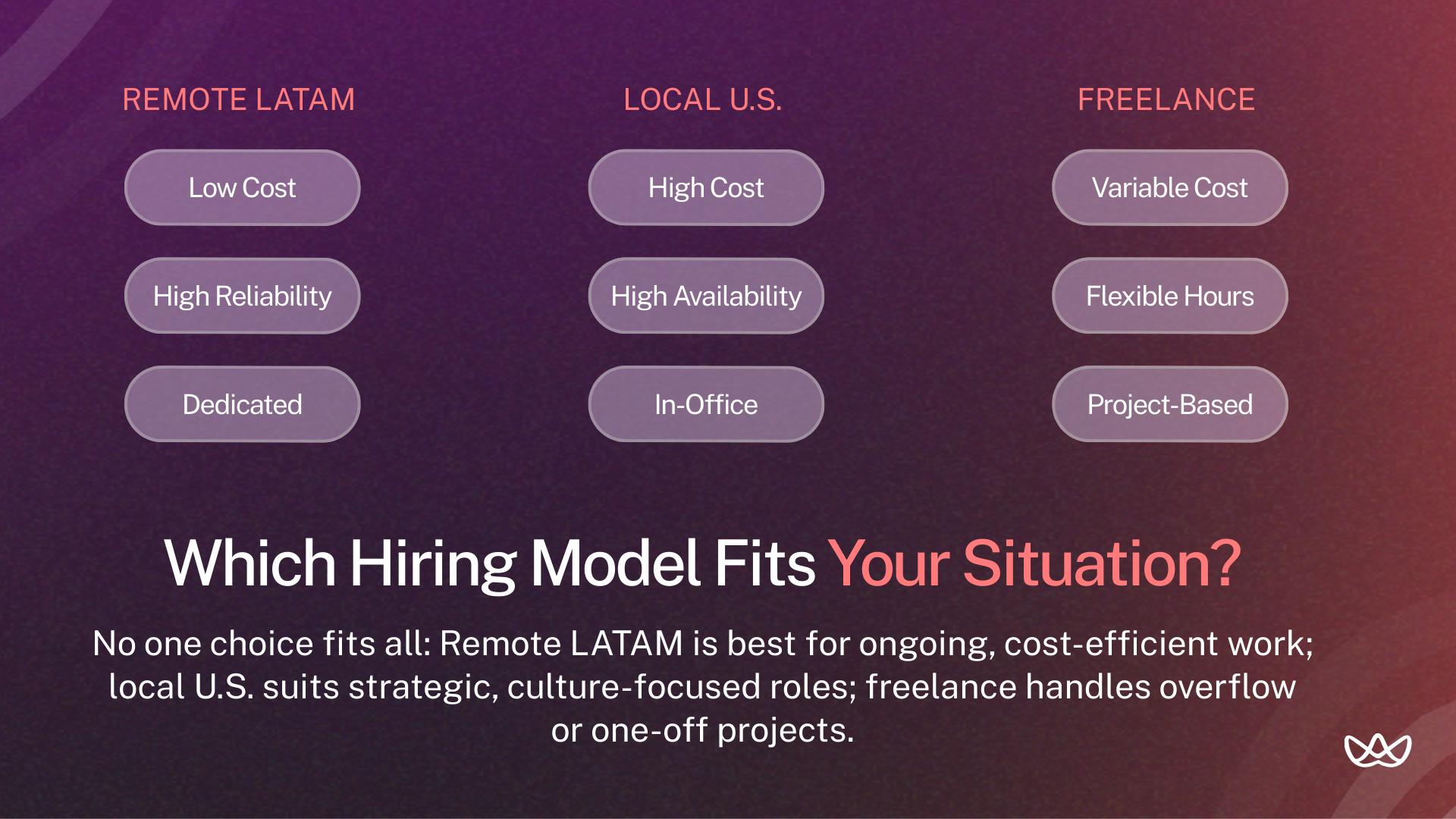
It depends on your project. Freelancers are great for quick tasks, remote designers work best for long-term projects, and local designers bring valuable regional insight. Many teams mix and match to get the right balance of speed, expertise, and stability.
Cost Comparison
Local U.S. hires cost the most but offer maximum availability. Freelancers vary wildly in pricing. Remote full-time sits in the middle with predictable costs and dedicated capacity.
Communication & Time Zone Differences
LATAM designers work within 1-3 hours of U.S. Eastern time. That enables same-day feedback, real-time Figma collaboration, and meetings at reasonable hours.
Local hires offer face-to-face communication but at premium cost. Freelancers juggle multiple clients, so response times vary regardless of location.
Quality, Speed & Collaboration
Remote LATAM: Consistent output from dedicated resources. Quality comparable to U.S. designers. Real-time collaboration possible.
Local U.S.: Highest availability and cultural alignment. Premium pricing. Best for strategic, high-touch work.
Freelance: Fast for defined projects. Quality varies dramatically. You handle all project management.
What a Remote Web Designer Actually Does
A remote web designer turns complex goals into user-friendly, responsive designs, creating wireframes, mockups, and prototypes while keeping brand consistency. They collaborate using tools like Figma, manage content in platforms like WordPress, handle light front-end tasks, and apply SEO and A/B testing to ensure sites look professional and drive conversions.
1. UX/UI, Wireframing & Conversion-Focused Layouts
A remote web designer builds interfaces and user flows that guide visitors toward specific actions.
Why it matters: Pretty designs that confuse users don't convert. Strategic UX turns traffic into revenue.
Example: The designer maps homepage hierarchy: headline captures attention, subhead explains value, social proof builds trust, CTA converts. Each element serves a purpose in the conversion flow.
2. Mobile-First & Responsive Execution
Design starts on mobile screens and scales up to desktops, ensuring the site works well where most users visit.
Why it matters: Over 50% of traffic comes from mobile. Poor mobile experiences cause immediate bounces.
Example: Touch targets sized for thumbs, navigation that collapses appropriately, forms usable on small screens. Desktop becomes the expanded version, not the other way around.
3. SEO-Friendly Page Structures & CRO Support
Design choices - from headings to images - impact both search visibility and conversions.
Why it matters: Design decisions impact SEO (heading hierarchy, image optimization, page speed) and conversions (CTA placement, form design, visual flow).
Example: Proper H1-H6 structure, optimized images, CTAs placed at strategic scroll depths based on user behavior data.
4. Design-to-Development Handoff for Faster Builds
Designers deliver specs and assets that developers can use without constant back-and-forth.
Why it matters: Poor handoffs cause weeks of back-and-forth. Clean handoffs save hours.
Example: Organized Figma files with proper naming, component variants, spacing specs, and exportable assets. Developers inspect directly without asking questions.
Top Places to Hire a Remote Web Designer
The right platform depends on your project and timeline. Some focus on vetted full-time talent, others on quick freelance tasks, each with its own strengths and limitations.
1. Floowi - Pre-Vetted LATAM Web Designers (Best for Agencies)
Floowi handles candidate screening so you don’t have to review hundreds of applications. Floowi designers are pre-qualified for technical skills, English proficiency, and remote work readiness. Through Floowi, you can hire full-time, bilingual designers in under 15 days.
2. Upwork
Upwork is a large freelance marketplace with reviews and work history. On Upwork, quality varies, so it works best for project-based tasks where you can test a designer with a small initial job.
- Pros: Client reviews, escrow protection, large talent pool
- Cons: Platform fees, inconsistent quality, requires screening
3. Fiverr
Fiverr is budget-friendly for small, quick tasks. Fiverr’s quality can be hit or miss, and it’s rarely suited for ongoing partnerships.
- Pros: Low cost, fast turnaround
- Cons: Variable quality, transactional relationships
4. Dribbble
Dribbble showcases designers’ portfolios with a focus on visual style and concept work rather than shipped projects. Hiring through Dribbble often requires cold outreach.
- Pros: High-quality visuals, style matching
- Cons: Concept-heavy, outreach required
5. LinkedIn
LinkedIn allows you to search for designers by skill, location, and experience. LinkedIn is good for finding candidates open to opportunities, though there’s no built-in quality filtering.
- Pros: Professional context, detailed profiles
- Cons: High volume of applicants, no vetting
Where to Find Remote Web Designers
Once you decide to hire remotely, the next step is knowing where to look. Different platforms cater to different needs, from quick freelance tasks to full-time, vetted designers.
Top Freelance Marketplaces (Pros & Cons)
Freelance marketplaces give you access to a large pool of designers but require careful screening.
- Upwork: Largest talent pool with reviews and work history. Platform fees add 5-20% to costs. Quality varies, so test with small initial tasks.
- Toptal: Claims to vet the top 3% of talent. Rates are higher, but initial screening is stronger. Best for senior roles or critical projects.
- Fiverr: Budget-friendly for simple tasks. Not suitable for complex or ongoing work.
Portfolio Platforms (Behance, Dribbble)
These are visual-first platforms where designers showcase their style. They’re useful if you need a specific aesthetic, but portfolios often show concept work rather than shipped projects. Cold outreach may take extra effort to get responses.
Nearshore Talent Partners (Floowi for Pre-Vetted LATAM Designers)
Nearshore partners like Floowi pre-screen candidates before you see them, verifying technical skills, English proficiency, and remote readiness. This approach is faster than direct hiring and carries lower risk than marketplaces.
Best for: Companies that need dedicated full-time capacity without U.S. salary costs.
Remote-Friendly Job Boards for Full-Time Hires
These boards are good for posting roles when you want a wider pool of full-time remote applicants:
- We Work Remotely: Popular, high volume of applications.
- Remote OK: Similar to WWR, strong designer traffic.
- AngelList: Startup-focused, good if offering equity or startup-friendly terms.
Remote Web Designer for Hire: Where They Perform Best
Remote web designers work best on tasks that are clearly defined and can be managed online. They are effective at:
- Building landing pages with fast turnaround.
- Redesigning websites with a clear scope.
- Making ongoing CRO improvements based on analytics.
- Creating and maintaining design systems.
- Producing marketing pages for campaigns.
They are less suited for projects that are highly ambiguous or require regular in-person collaboration, such as roles involving frequent client meetings or on-site work.
How to Evaluate Remote Web Designers
When evaluating a remote designer, focus on results and technical fit, not just looks. Check portfolios for measurable impact, responsiveness, and accessibility. Ask about their process, tools, and how they manage work independently.
Must-Have Technical & UX Skills in 2026
Look for skills like Figma, responsive design, UX reasoning, CMS experience, and basic HTML/CSS, and check them through portfolios, explanations, and hands-on experience.
How to Review Portfolios for Real Business Impact
Look for:
- Case studies with business context, not just visuals.
- Before/after examples showing improvement.
- Shipped work that went live.
- Mobile and responsive versions.
- Explanation of constraints and challenges.
Red flags:
- Only concept work with no shipped projects.
- Identical styling across every project.
- No mobile examples.
- Can't explain reasoning behind decisions.
- No metrics or business outcomes mentioned.
Interview Questions That Show Strategy, Not Just Looks
Asking the right questions helps you see how a designer thinks and approaches real challenges, not just how their work looks.
Creative questions:
- Walk me through a project where your first approach failed.
- How do you prioritize elements on a landing page?
- Describe handling a client with outdated brand guidelines.
Technical questions:
- How do you organize Figma files for developer handoff?
- What's your responsive design process?
- How do you handle designs developers say are hard to build?
Remote-specific questions:
- How do you communicate progress proactively?
- What async collaboration tools do you prefer?
- How do you handle timezone differences?
How to Test Design Skills with a Paid Trial
A short paid trial shows how a designer actually works, not just what their portfolio looks like.
- Redesign one section of an existing landing page (2-3 days)
- Create a small component library for a specific use case (3-5 days)
- Solve a real UX problem your site currently has (2-4 days)
Always pay for trials and use them to evaluate file organization, communication, responsiveness, and overall output quality.
Remote Web Designer Hiring Checklist
Use this checklist to ensure a candidate meets both technical and collaboration requirements for remote work.
The 4 Pillars of Remote Web Design Excellence
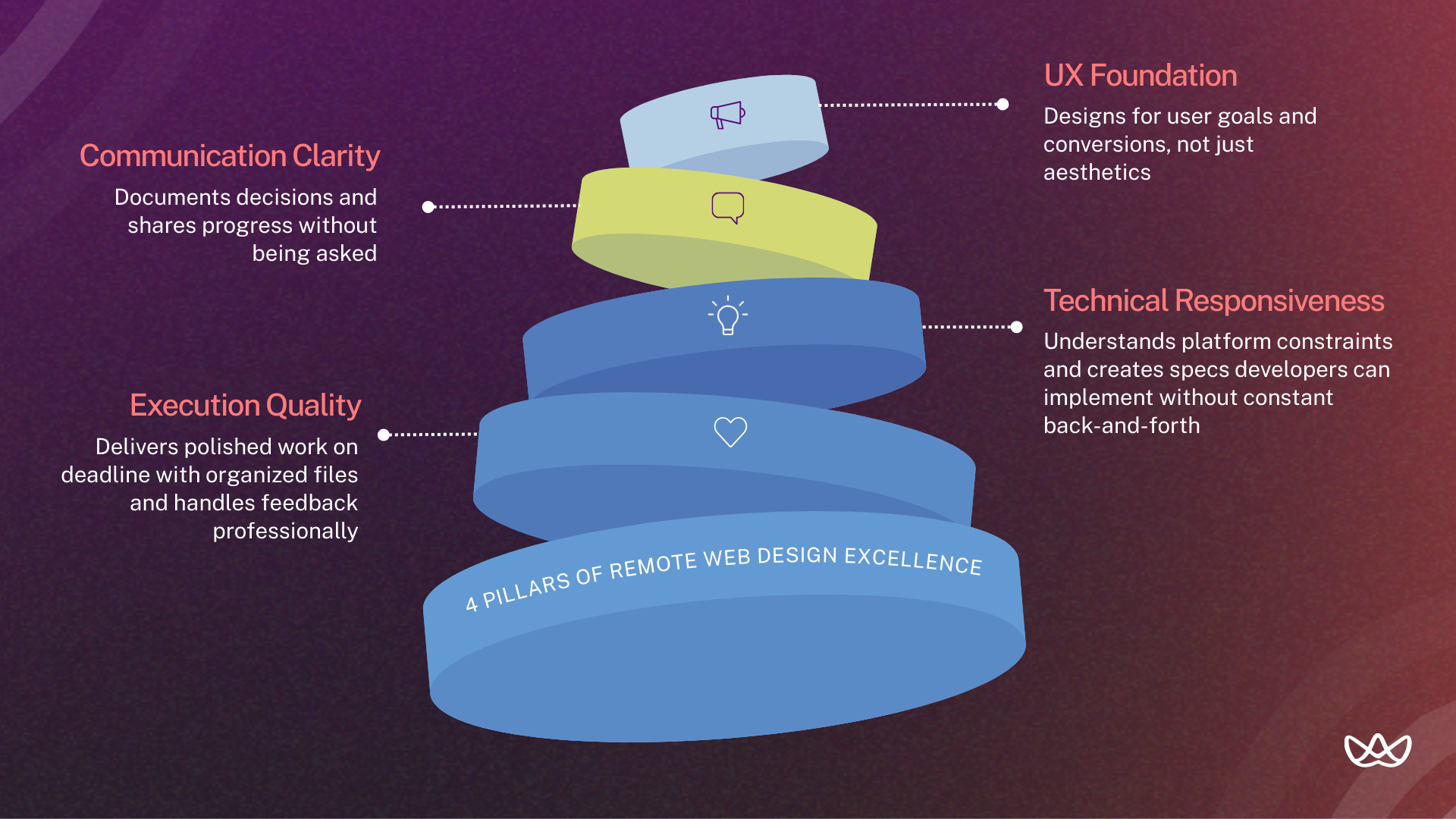
When evaluating a remote designer, look at how they solve UX problems, communicate with teams, convert designs into code, and consistently deliver high-quality work.
1. UX Foundation: Understands user psychology, conversion principles, and designs for outcomes rather than aesthetics alone.
2. Communication Clarity: Articulates decisions clearly, documents work thoroughly, and proactively shares progress.
3. Technical Responsiveness: Creates designs that translate cleanly to code, understands platform constraints, and collaborates effectively with developers.
4. Execution Quality: Delivers polished work on time, maintains organized files, and handles feedback professionally.
How Much It Costs to Hire a Remote Web Designer
Hiring a remote web designer from LATAM can cut costs significantly while maintaining quality. Here’s a snapshot of typical rates by experience level, comparing U.S. and LATAM costs.
How Experience, Scope & Tooling Affect Cost
These factors can increase a designer’s rates:
- Senior experience (5+ years)
- Specialized industry knowledge (fintech, healthcare, SaaS)
- Full-stack design capability (design + Webflow implementation)
- Complex project scope (web apps vs. marketing sites)
- Rush timelines
- Premium tool expertise (advanced Webflow, Framer)
Hourly, Monthly and Project-Based Rates Compared
Hourly: Best for variable workloads. Risk of scope creep. LATAM range: $25-$75/hour.
Monthly retainer: Predictable costs, dedicated capacity. LATAM range: $2,000-$5,500/month.
Project-based: Fixed scope, fixed price. Risk shifts to designer. Landing page: $500-$3,000. Full site: $3,000-$15,000.
Cost Benchmarks for Small, Mid-Size, and Enterprise Projects
Remote LATAM designers provide cost-effective options across project sizes, with pricing and timelines varying by scope.
Step-by-Step Guide to Hiring a Remote Web Designer
1. Define Scope & Deliverables Before Hiring
Before searching, clarify:
- Number of pages or screens
- Platform (Webflow, WordPress, Shopify, custom)
- Design only or design + implementation
- Timeline and milestones
- Budget range
- Success metrics
Vague briefs attract vague proposals. Specific requirements get specific responses.
2. Write a High-Conversion Job Description
Include:
- Tools required (Figma, specific CMS)
- Deliverable types (responsive pages, not apps)
- Collaboration expectations (async vs. sync)
- Portfolio requirements
- Evaluation process
Skip generic descriptions. Specificity filters out mismatched candidates.
3. Shortlist, Interview & Portfolio Evaluation
Step 1: Review portfolios for shipped work and UX reasoning (15-20 minutes each).
Step 2: Video interview for communication and culture fit (30-45 minutes).
Step 3: Technical questions to verify depth (included in interview).
Step 4: Paid trial for top 2-3 candidates (2-5 days each).
Step 5: Reference checks before final offer.
4. Set Clear Expectations, KPIs & Communication Cadence
Before work begins, align on:
- Deliverables and acceptance criteria.
- Communication schedule (daily async updates, weekly syncs).
- Tools and channels (Slack, Figma, Loom).
- Feedback process and revision limits.
- Performance metrics for ongoing roles.
- Escalation paths for blockers.
Written agreements prevent misunderstandings later.
Common Challenges (and How to Avoid Them)
The biggest challenges with remote web designers are keeping communication smooth, making sure technical expectations match, and ensuring their work actually supports your business goals.
1. Time Zone Alignment & Response Times
Challenge: Feedback delays when time zones don't overlap.
Solution: Hire from LATAM for U.S. alignment (1-3 hour difference). Establish expected response windows. Use async video (Loom) for complex feedback.
2. Async Collaboration & Tooling
Challenge: Miscommunication when you can't tap someone on the shoulder.
Solution: Document everything in shared systems. Use Figma comments for design feedback. Record video walkthroughs instead of long text explanations. Establish which decisions need sync discussion vs. async resolution.
3. Maintaining Quality & Version Control
Challenge: Multiple file versions, lost feedback, unclear what's current.
Solution: Single source of truth in Figma. Clear naming conventions. Version history with dated milestones. Design reviews before major handoffs.
LATAM Remote Web Designers: Why They Stand Out
LATAM designers fit North American teams with time zones that allow real-time collaboration. They offer strong technical skills at 30-70% lower rates and work smoothly thanks to good English and cultural alignment.
1. English Proficiency & U.S.-Aligned Communication
Design education in Argentina, Colombia, Mexico, and Brazil has produced designers who communicate fluently with U.S. teams. Many have years of experience serving American agencies directly.
Vetted partners screen specifically for English proficiency. You're not guessing whether someone can explain their design thinking clearly.
2. Strong Expertise with Figma, Webflow & Modern Tooling
LATAM designers learn the same tools as U.S. designers. Figma, Webflow, Framer, and modern component-based workflows are standard. Many have deeper Webflow expertise than U.S. generalists because implementation skills command premium rates in their markets.
3. Faster Delivery Benchmarks (Wireframes, Landing Pages, Full Sites)
LATAM designers often deliver faster than U.S. freelancers, especially when working full-time on a single project. Dedicated focus and aligned time zones help reduce turnaround for wireframes, landing pages, and full sites.
Your Next Move
Remote LATAM designers deliver U.S.-level quality at lower cost with time zones that support real-time collaboration. Before starting, define scope and deliverables, check portfolios for results, and consider a paid trial, keeping the four pillars - UX, communication, technical responsiveness, and execution quality - in mind.
Key Takeaways:
- Remote hiring cuts costs 40–50% vs. U.S. salaries.
- LATAM designers align with U.S. time zones (1-3 hours).
- Review portfolios for results, not just looks.
- Paid trials help confirm collaboration style.
- Follow the four pillars of design excellence.
- Vetted partners speed up hiring and reduce risk.
- Set clear scope and communication upfront.
Hire remote web designers with Floowi and get vetted LATAM full-time, bilingual designers ready to integrate with your team. Book your free consultation today.
Frequently Asked Questions
How do remote web designers reduce costs compared to U.S. in-house hires?
Cost savings come from geographic arbitrage. LATAM designers earn competitive wages for their local markets while costing 40-50% less than U.S. equivalents. Quality remains comparable because tools and training resources are globally accessible.
What's the ROI of hiring LATAM designers vs. U.S. freelancers?
LATAM full-time designers offer predictable monthly costs with dedicated capacity. U.S. freelancers charge hourly rates that compound quickly. For ongoing needs, LATAM delivers better ROI through consistency and lower total cost.
How does faster hiring improve project timelines?
Vetted partners reduce hiring from 6-8 weeks to 10-15 days. That means projects start sooner, client deadlines get met, and you don't lose momentum waiting for recruitment cycles.
What technical skills are non-negotiable in 2026?
Figma proficiency, responsive design expertise, and CMS platform familiarity. HTML/CSS understanding helps with dev handoffs. Remote communication skills (async tools, proactive updates) matter equally.
How do agencies evaluate UX thinking in portfolios?
Look for case studies explaining reasoning: why elements are placed where they are, what user problems were solved, how business goals shaped decisions. Candidates who only describe visual choices lack strategic depth.
What portfolio red flags should hiring managers watch for?
Only concept work, identical styling across projects, no mobile examples, inability to explain decisions, and no evidence of shipped work. These signal either inexperience or poor documentation habits.
How do U.S. rates compare to LATAM rates in 2026?
Senior U.S. designers cost $95,000-$130,000 annually. Equivalent LATAM talent costs $42,000-$65,000. Hourly rates show similar gaps: $120-$175 U.S. versus $50-$75 LATAM for senior work.
How do vetted nearshore partners like Floowi reduce hiring risk?
Partners pre-screen for technical skills, English proficiency, and remote readiness before you see candidates. They handle initial vetting that would take you weeks. Many provide ongoing support for retention and performance.




