

.png)




Web designer skills directly impact how users experience your website, whether they convert, and how your brand gets perceived online. Companies hiring designers in 2026 need people who understand both visual execution and business outcomes.
The essential web designer skills cover technical abilities like responsive design and accessibility, creative capabilities such as typography and color theory, and soft skills like communication and strategic thinking. Strong designers connect aesthetics to conversion goals, user experience to brand consistency, and creative vision to real technical constraints..
Let’s explore the skills that matter most when evaluating candidates, how they impact business performance, and where to find vetted LATAM web designers who collaborate effectively in English.
What Are Web Designer Skills?
Web designer skills are the technical, creative, and collaborative abilities designers use to create websites that look solid, function properly, and support business goals. These skills affect whether a site converts visitors, loads efficiently, works on mobile devices, and offers accessible experiences for all users.
Companies need designers who can turn business requirements into clear visual interfaces that guide users toward specific actions. A designer defines layout, selects colors and typography, structures information hierarchy, and makes sure the site works across devices and browsers.
The role differs from web development, which focuses on coding and technical implementation. Designers concentrate on how a site looks and how users interact with it. Strong designers understand development constraints well enough to create designs developers can build without friction.
How These Skills Impact Website Performance and Conversions
Web designer skills influence how users interact with a website, how quickly pages load, and whether visitors complete desired actions.
- Visual hierarchy and layout guide users to key elements like calls-to-action. Well-structured layouts make it easier for users to find information.
- Responsive design ensures websites function properly on mobile devices. Sites that don’t adapt well often see higher bounce rates on smaller screens.
- Accessibility allows users with disabilities to use your site effectively, expanding reach and reducing potential compliance issues.
- Page speed is affected by design choices such as image optimization, font usage, and animation. Faster-loading pages support better search performance and user experience.
UX fundamentals like clear navigation, logical content flow, and simple forms reduce friction and make it easier for users to complete tasks.
Hard vs Soft Web Designer Skills: What Matters Most?
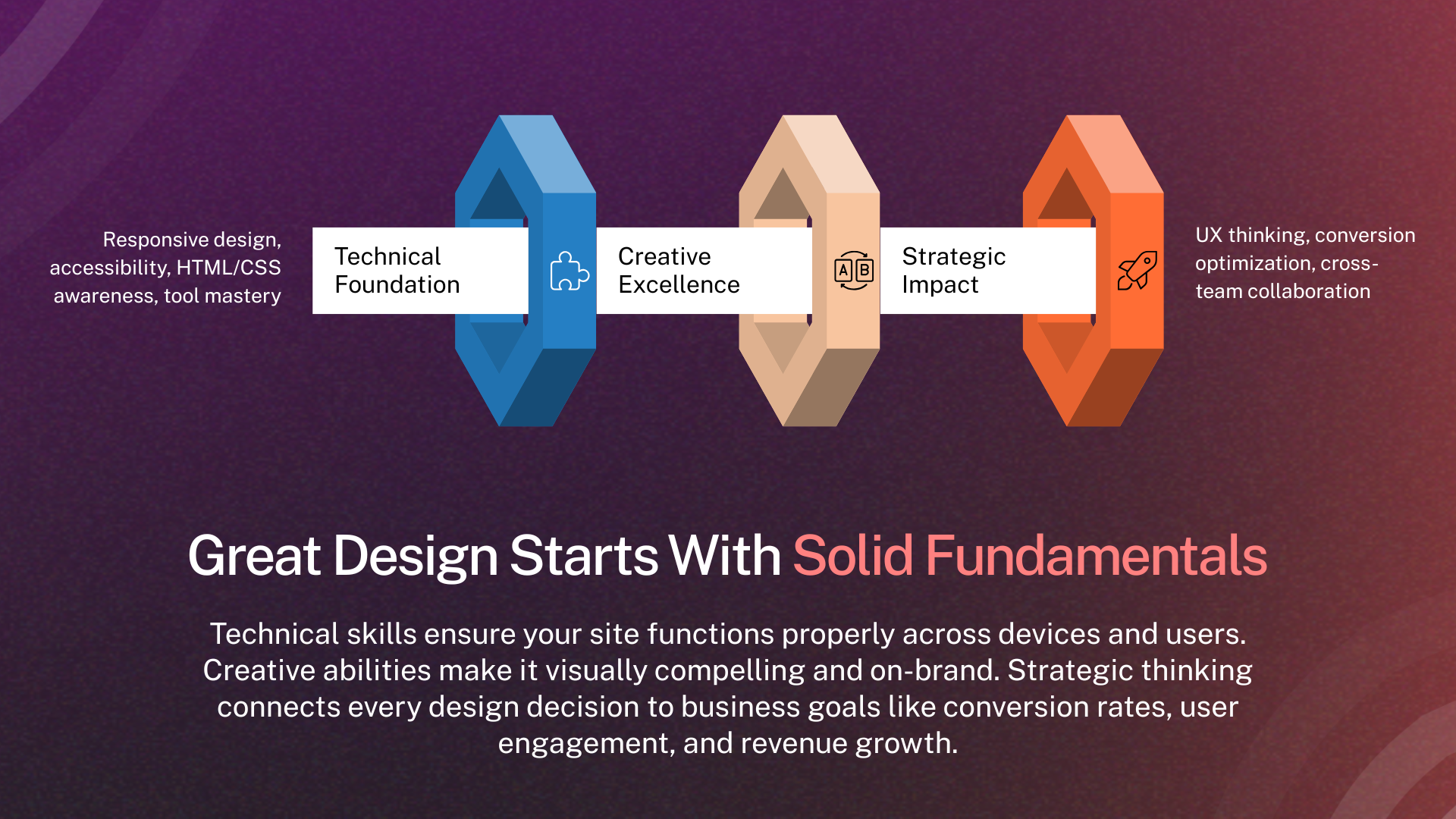
Web designer skills fall into two categories: hard (technical) and soft (collaborative). Both are important for project outcomes.
Hard skills cover measurable abilities such as:
- Using design tools like Figma or Adobe XD
- Building responsive layouts
- Understanding HTML and CSS basics
- Applying accessibility standards
Soft skills affect how a designer works with teams and stakeholders:
- Clear communication
- Time and task management
- Collaboration with developers and other teams
- Explaining design decisions effectively
The emphasis varies by role. Junior designers rely more on hard skills to produce reliable work. Senior designers depend on soft skills to guide projects and align design with business goals.
Designers who have both sets of skills produce work that meets technical requirements and integrates smoothly with teams. Lacking either can create issues: strong technical skills alone may lead to misalignment, while strong communication alone may result in designs that are hard to implement.
Core Technical Skills Every Web Designer Should Have
In 2026, web designers need strong skills in Figma and AI-assisted tools for prototyping and accessibility checks. HTML5, CSS3, and JavaScript remain essential, along with managing design tokens for scalable systems. Some work with 3D libraries or WebAssembly for interactive experiences, while accessibility, privacy, and fast-loading design are now integral to technical execution.
1. Visual Design Principles
Effective visual design uses composition, contrast, hierarchy, and spacing to guide users’ attention and communicate information clearly.
Why it matters: Visual design determines first impressions and credibility. Users form opinions about trustworthiness within 50 milliseconds of seeing a site. Poor visual design drives immediate exits regardless of content quality.
Example: A landing page uses size contrast to emphasize the primary CTA button, making it 40% larger than secondary actions. Color contrast between the button and background ensures it stands out. White space around the button prevents visual clutter that would compete for attention.
2. User Experience (UX) Fundamentals
Good UX focuses on creating flows and interactions that let users accomplish tasks efficiently with minimal friction.
Why it matters: Good UX increases conversions and reduces support costs. Users abandon sites that confuse them or make tasks difficult. Strong UX design anticipates user needs and removes obstacles.
Example: An e-commerce checkout flow reduces from 5 steps to 3 by combining shipping and billing information on one screen. Adding progress indicators shows users how close they are to completion. This redesign increases checkout completion rates by 25%.
3. User Interface (UI) Best Practices
UI design ensures interactive elements like buttons, forms, and navigation are intuitive, consistent, and follow patterns users recognize.
Why it matters: Familiar UI patterns reduce cognitive load. Users don't need to learn how your site works if you follow conventions they already understand from other sites. Consistency across pages builds confidence and reduces errors.
Example: A SaaS dashboard uses standard UI patterns like a left sidebar for navigation, breadcrumbs showing current location, and right-aligned user profile menus. New users navigate successfully without training because these patterns match their mental models from other software.
4. Responsive and Mobile-First Design
Responsive design creates layouts that adapt smoothly to any screen size, starting with mobile and scaling up to larger devices.
Why it matters: Mobile traffic accounts for 55-60% of web traffic globally. Sites that don't work well on mobile lose more than half their potential audience. Google's mobile-first indexing also means mobile experience affects search rankings.
Example: A business website designs the mobile version first with a simplified navigation menu, touch-friendly button sizes (minimum 44x44 pixels), and stacked content sections. The desktop version adds a horizontal navigation bar and multi-column layouts while maintaining the same content hierarchy.
5. HTML & CSS Awareness
Understanding how HTML structures content and CSS styles it allows designers to create layouts that are practical to implement.
Why it matters: Designers who understand code constraints create more buildable designs. They avoid impossible layouts, use CSS-friendly approaches, and communicate better with developers through shared technical vocabulary.
Example: A designer understands that fixed-width layouts in pixels create responsive design challenges, so they design using flexible units like percentages or viewport widths. They know CSS Grid handles complex layouts better than absolute positioning, shaping their design approach accordingly.
6. Web Accessibility (WCAG Compliance)
Accessible design considers users with visual, auditory, motor, or cognitive impairments to make websites usable for everyone.
Why it matters: Accessibility is both a legal requirement for many companies and an ethical obligation. Inaccessible sites face lawsuits, lose customers, and damage brand reputation. Accessible design also improves usability for everyone.
Example: A designer ensures all interactive elements can be accessed via keyboard for users who can't use a mouse. Color combinations meet 4.5:1 contrast ratios so visually impaired users can read text. Form fields include clear labels and error messages that screen readers can announce.
7. Mastery of Design Tools (Figma, Adobe XD, Webflow)
Proficiency in industry-standard tools enables designers to create mockups, prototypes, and design systems efficiently and collaboratively.
Why it matters: Tool mastery affects speed and quality. Designers fluent in Figma work 2-3x faster than those learning while designing. Good tools also improve handoff to developers through specs, assets, and interactive prototypes.
Example: A designer builds a component library in Figma with variants for buttons, forms, and cards. This library maintains consistency across dozens of pages and lets developers extract exact spacing, colors, and typography specs. Changes to the library automatically update all instances.
8. Motion and Micro-Interactions
Subtle animations and transitions guide attention, provide feedback, and make interfaces feel responsive and polished.
Why it matters: Motion adds personality and provides important feedback. A button that changes on hover confirms it's clickable. Loading animations reassure users that actions are processing. Smooth transitions help users understand how interface states relate.
Example: A form submission button shows a loading spinner when clicked, then transitions to a checkmark when complete. This micro-interaction confirms the action succeeded without requiring a separate success page, reducing user uncertainty and improving perceived speed.
9. Basic Coding Knowledge for Better Developer Handoffs
A working understanding of HTML, CSS, and JavaScript helps designers communicate requirements and create feasible designs for developers.
Why it matters: Miscommunication between designers and developers creates delays, frustration, and compromised designs. Designers who speak developer language reduce iteration cycles and build better working relationships.
Example: A designer annotates their Figma file with notes about hover states, breakpoint behaviors, and animation timing. They understand z-index for layering, flexbox for layouts, and can explain desired interactions in terms developers immediately understand.
10. SEO-Friendly Layout and Structure
Designing pages with clear hierarchy, semantic HTML, and optimized content supports both user experience and search engine visibility.
Why it matters: Design decisions affect search rankings. Poor information architecture confuses search engines. Slow-loading images hurt Core Web Vitals scores. Designers who consider SEO help sites attract organic traffic.
Example: A designer structures blog posts with one H1 heading for the title, H2s for major sections, and H3s for subsections. They design hero images at appropriate dimensions to avoid massive file sizes. Navigation menus use text links rather than images so search engines can follow them.
Creative Skills That Strengthen Design Quality
11. Typography for Readability and Conversion
Effective typography ensures that text is readable, organized, and reflects the brand’s voice.
Why it matters: Typography affects readability and credibility. Body text that's too small or low-contrast reduces comprehension and increases bounce rates. Poor font pairings look unprofessional and damage trust.
Example: A content-heavy site uses a serif font at 18px for body text with 1.6 line height for comfortable reading. Headings use a contrasting sans-serif font that's 2-3x larger than body text, creating clear hierarchy. Link colors differ from body text by at least 3:1 contrast ratio.
12. Color Theory for Branding Consistency
Understanding how colors work together, convey meaning, and create emotional responses while maintaining brand consistency.
Why it matters: Colors trigger psychological associations and affect conversion rates. CTA buttons in contrasting colors get 20-30% more clicks. Consistent color usage across pages reinforces brand recognition and builds trust.
Example: A financial services site uses blue as the primary color to convey trust and stability. Green accents highlight positive actions like "Apply Now" buttons. Red appears only for warnings and errors. This consistent color language helps users understand interface meaning without reading every label.
13. Layout and Composition Techniques
Organizing page elements with grids, alignment, and spacing makes designs clear and scannable.
Why it matters: Good composition makes content easy to scan and navigate. Users read web pages in F-patterns or Z-patterns, and layouts should accommodate these natural eye movements. Poor composition feels cluttered and overwhelming.
Example: A homepage uses a 12-column grid system for alignment consistency. Important content sits in the top-left quadrant where eye-tracking studies show attention concentrates. White space separates distinct sections, preventing visual overload and improving focus.
14. Brand Identity and Visual Systems (Design Systems & Component Systems)
Creating consistent visual languages through design systems ensures coherence across all pages and products.
Why it matters: Consistency builds recognition and trust. Design systems dramatically speed up design and development by providing pre-built components. They ensure new pages or features maintain brand coherence without reinventing everything.
Example: A company's design system documents all button variants (primary, secondary, disabled), input fields, cards, and navigation patterns. Designers reference this system when creating new pages. Developers build components once and reuse them. The site maintains perfect consistency across 200+ pages without manual checking.
Essential Soft Skills Companies Should Look For
15. Clear and Efficient Communication
Effective designers explain decisions clearly, gather requirements accurately, and collaborate across teams.
Why it matters: Design requires constant communication with clients, developers, marketers, and executives. Misunderstandings cause rework, missed deadlines, and designs that miss business objectives. Clear communication prevents these issues.
Example: A designer presents three homepage concepts to stakeholders with written rationale for each approach tied to business goals. They use specific terminology like "above the fold" and "conversion funnel" that stakeholders understand. Questions get answered with concrete reasoning rather than "it looks better this way."
16. Time and Project Management
Managing deadlines, prioritizing tasks, and keeping multiple projects on track ensures consistent delivery.
Why it matters: Design delays cascade through development timelines, affecting launch dates and revenue. Designers who miss deadlines create stress and reduce team trust. Strong project management keeps work flowing smoothly.
Example: A designer breaks a website redesign into phases: discovery (1 week), wireframes (1 week), mockups (2 weeks), revisions (1 week). They communicate progress weekly and flag potential delays early so teams can adjust plans rather than discovering problems at deadlines.
17. Cross-Functional Collaboration
Working well with developers, marketers, and product teams ensures designs are practical and effective.
Why it matters: Design sits at the intersection of multiple disciplines. Developers need feasible implementations. Marketers need conversion optimization. Product teams need feature clarity. Designers who can't collaborate across functions create friction and suboptimal outcomes.
Example: A designer joins weekly sprint planning with developers to discuss upcoming features. They review technical constraints before finalizing designs. They collaborate with marketing on A/B test hypotheses. This cross-functional approach produces designs that actually get built and drive results.
18. Strategic, Conversion-Driven Thinking
Design decisions should be guided by business objectives and user behavior data, not personal preferences.
Why it matters: Pretty designs that don't convert waste money. Strategic designers ask "what should users do here?" and optimize for that outcome. They use data from analytics and user research to inform decisions rather than guessing.
Example: A designer notices the pricing page has high traffic but low conversions. They redesign it based on competitor analysis and best practices: larger CTAs, clearer feature comparisons, social proof testimonials. The new design increases conversions by 35% because it addresses user decision-making needs.
19. Strong Attention to Detail
Careful review of spacing, alignment, and minor inconsistencies ensures professional, polished designs.
Why it matters: Details signal quality. Misaligned elements, inconsistent spacing, or pixelated images make sites look amateur regardless of overall design quality. Users judge credibility based on these details.
Example: A designer reviews every page at multiple screen sizes before handoff. They verify all buttons use consistent padding, icons align properly to text, and spacing follows the 8-point grid system. They catch a logo that's 2 pixels off-center and fix it before anyone else notices.
20. Continuous Learning and Adaptability
Keeping up with trends, tools, and best practices ensures designers stay effective and relevant.
Why it matters: Design standards and tools evolve constantly. Designers who don’t adapt risk producing outdated work and slowing team progress.
Example: A designer learns about new CSS container queries that solve responsive design challenges. They experiment with the technique and introduce it to the development team. This proactive learning improves project outcomes and demonstrates value beyond just executing tasks.
Advanced and Emerging Skills in 2026
21. Using AI Tools in the Design Workflow
AI can speed up parts of your design process, like generating ideas, creating assets, suggesting copy, or handling repetitive tasks.
Why it matters: AI tools like Midjourney, DALL-E, and ChatGPT accelerate certain design phases significantly. Designers who use AI effectively work faster while maintaining quality. Those who ignore AI risk becoming less competitive.
Example: A designer uses AI to generate 20 hero image concepts in 10 minutes rather than spending hours searching stock photos. They use ChatGPT to draft interface copy variations for A/B testing. They use Figma plugins with AI features to remove image backgrounds and upscale graphics automatically.
22. 3D Elements and Advanced Prototyping
Adding 3D graphics or building interactive prototypes helps you test complex interactions before developers start coding.
Why it matters: 3D elements add visual interest and can explain products better than 2D images. Advanced prototypes let teams test interactions with users before writing code, reducing expensive development mistakes.
Example: A SaaS product designer creates a Figma prototype with realistic interactions including dropdown animations, form validation, and multi-step flows. Stakeholders can click through the entire user journey. User testing reveals confusion in step 3, which gets fixed before development starts.
23. Mobile App Interface Design
Designing for mobile apps means following platform-specific patterns, gestures, and component rules.
Why it matters: Mobile apps require different approaches than websites. Platform conventions differ between iOS and Android. Designers who understand these nuances create apps that feel native rather than awkward web conversions.
Example: A designer follows iOS Human Interface Guidelines for an iPhone app using system fonts, standard navigation patterns, and iOS-style action sheets. The Android version uses Material Design principles with a floating action button and bottom navigation. Each version feels natural to its platform.
Examples of How These Skills Improve Business Performance
The right web designer skills have a measurable impact on business results:
- Better UX: Clear navigation and intuitive flows reduce support tickets by 30–40%, freeing teams and improving customer satisfaction.
- Accessibility: Implementing alt text and keyboard navigation can open markets to users with disabilities, increasing revenue. One site saw an 8% boost.
- Responsive design: Mobile-optimized layouts cut bounce rates from 65% to 45% and improved mobile conversions by 22%.
- Design systems: Reusable components reduce development time by 40–50% and ensure consistency across products.
Data-driven redesigns: Using analytics to guide changes can lift conversions 25–45%. One B2B landing page redesign increased demo requests by 38%.
How Companies Can Evaluate Web Designer Skills
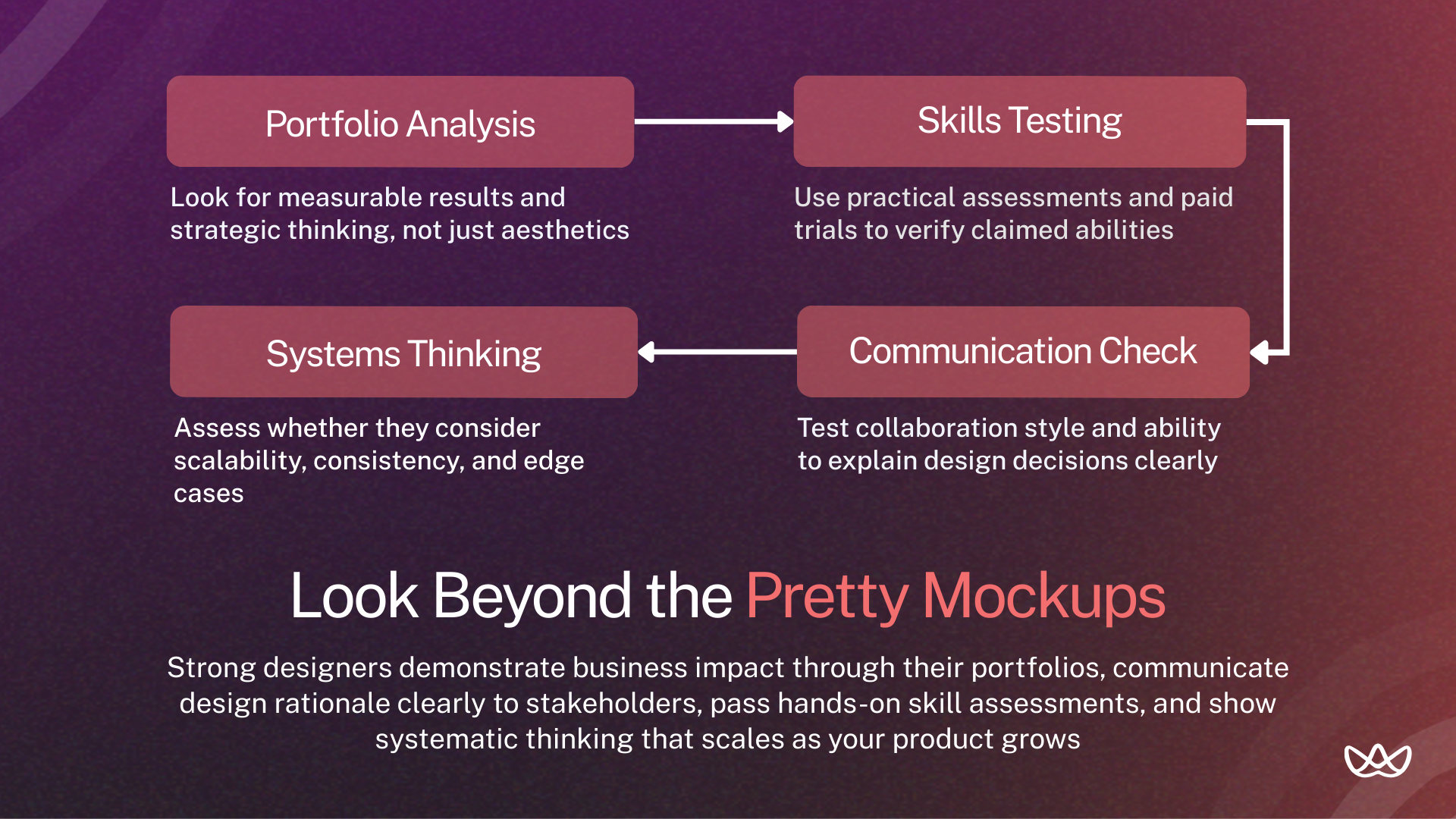
Companies assess web designers by their measurable impact and AI-assisted workflow. Live challenges test rapid prototyping, while technical checks focus on Core Web Vitals and conversions. Soft skills are evaluated through collaboration and explaining design choices. Tools like TestGorilla or Maze measure proficiency before interviews.
Reviewing Portfolios for Strategy, Not Just Aesthetics
Portfolio evaluation should focus on outcomes and thinking process, not just visual appeal. Look for case studies that explain the problem, design process, and measurable results.
Strong portfolios include:
- Before and after metrics showing conversion improvements or engagement increases.
- Explanation of user research or data that informed design decisions.
- Multiple design iterations with reasoning for changes.
- Evidence of cross-functional collaboration with developers or marketers.
- Variety of work across different industries or project types.
- Clear articulation of design challenges and solutions.
Ask candidates to walk through their favorite project explaining why they made specific decisions. Listen for strategic thinking and business awareness rather than just "it looked better."
Using Skills Assessments and Paid Trials
Practical tests reveal abilities that portfolios might not show. Effective assessment approaches include:
- Design challenge: Give candidates a realistic brief like "redesign our pricing page to increase conversions" with 3-5 days to complete. Evaluate both the final design and their process explanation.
- Portfolio critique: Ask candidates to review your current site or a competitor's, identifying strengths, weaknesses, and specific improvement opportunities. This tests analytical skills and business awareness.
- Tool proficiency: Have candidates screen-share while completing a simple task in Figma like creating a responsive button component with variants. This verifies claimed tool mastery.
- Paid trial projects: For finalists, offer paid work on an actual project for 1-2 weeks. This provides real-world assessment of collaboration skills, communication, and work quality under normal conditions.
Red Flags When Reviewing Candidates
Warning signs that suggest potential problems:
- Portfolios showing only visual mockups without explaining context or results.
- Inability to discuss specific challenges or how they overcame obstacles.
- Claiming sole credit for team projects without acknowledging collaboration.
- Focusing entirely on aesthetics without mentioning user needs or business goals.
- No evidence of staying current with modern tools and techniques.
- Poor communication during the interview process with vague or defensive answers.
- Unwilling to do practical assessments or explain their design thinking.
- Portfolios that look suspiciously similar to popular Dribbble shots.
How to Spot Strong UX and Systems Thinking
Strong UX thinking shows through structured problem-solving approaches. Candidates should discuss user research, pain points, and how designs address specific needs rather than just looking good.
Systems thinking appears in portfolios showing:
- Documented design systems or component libraries
- Consistency across multiple pages or screens
- Consideration of edge cases and error states
- Scalable approaches that work as products grow
- Clear organization and logical information architecture
During interviews, ask how they'd approach designing a feature from scratch. Strong candidates mention research, competitive analysis, wireframing, testing, and iteration rather than jumping straight to visual design.
Where to Find Designers With These Skills (Including Vetted LATAM Talent)
Quality designers concentrate on specific channels:
- Vetted talent platforms like Floowi pre-screen candidates for skills, portfolio quality, and communication. This saves time filtering hundreds of applications. LATAM web designers on these platforms bring modern skills and collaborate effectively at competitive rates.
- Design communities like Dribbble, Behance, and Designer News attract active practitioners. Portfolio quality is visible upfront, though you still need to verify skills through interviews and assessments.
- Referrals from developers often produce strong candidates because developers work closely with designers and understand who collaborates well and produces buildable designs.
- LinkedIn works for senior hires willing to be headhunted. Search for specific tool combinations like "Figma + UX + responsive design" to find qualified candidates.
- LATAM talent hubs in countries like Mexico, Colombia, and Argentina offer skilled designers at 40-60% lower costs than U.S. equivalents while maintaining English fluency and timezone alignment.
Improving Web Designer Skills (For Teams & In-House Designers)
Keeping your design team sharp means making learning part of the routine. Good ways to do this include:
- Taking online courses for UX, accessibility, and design tools.
- Attending conferences like An Event Apart or Smashing Conference.
- Hosting internal lunch-and-learns to share skills and give feedback.
- Training on new features in Figma, Adobe XD, or prototyping tools.
- Cross-training with developers to understand technical constraints.
- Reading industry publications like Smashing Magazine or A List Apart.
Set aside 10-15 hours a month for learning to keep skills current and avoid stagnation.
Building Better Collaboration With Developers
Strong designer-developer relationships improve project outcomes significantly. Build collaboration through:
- Joint design reviews where developers provide feedback on feasibility early.
- Shared vocabulary through designers learning basic HTML/CSS concepts.
- Clear documentation in design handoffs with specs, assets, and interaction notes.
- Regular check-ins during implementation to address questions promptly.
- Pair programming sessions where designers sit with developers building features.
- Retrospectives after projects to discuss what worked and what needs improvement.
Designers who treat developers as partners rather than implementers produce better results and build team cohesion.
Adopting New Tools and Industry Best Practices
Design tools evolve constantly, and teams need processes for evaluating and adopting new solutions. Consider:
- Quarterly tool reviews to assess whether current stack still serves needs.
- Trial periods for promising new tools before full team adoption.
- Version control for design files using Figma's built-in versioning or Abstract.
- Design systems that document patterns and maintain consistency.
- Automated design-to-code handoff tools that reduce manual spec creation.
- Accessibility checkers integrated into design workflows.
- Performance budgets that designers must meet for image sizes and page weight.
Stay connected to design communities to learn about emerging tools before they become mainstream.
Quick Summary: Essential Web Designer Skills
The most critical web designer skills companies need in 2026:
- UX and UI fundamentals create interfaces that guide users.
- Responsive design keeps sites working on any device.
- Accessibility ensures usability for all and meets legal standards.
- SEO-friendly layouts help search engines understand pages.
- Communication and collaboration improve teamwork with developers and stakeholders.
- Mastery of tools like Figma supports efficient workflows.
- Visual design principles maintain hierarchy, balance, and aesthetics.
- Strategic thinking links design to business goals.
- Basic HTML and CSS knowledge ensures feasible designs.
- Typography and color theory keep content readable and on-brand.
These skills directly drive measurable business outcomes, helping teams improve conversions, efficiency, and user experience.
Your Next Move
The most important web designer skills bring together technical ability, creative quality, and strategic thinking. Designers should handle essentials like responsive design and accessibility reliably.
Top performers add strong communication, strategic thinking, and continuous learning. They connect decisions to user needs and business goals, collaborate across teams, and adapt to new tools and methods.
When hiring, focus on measurable portfolio outcomes, test collaboration and communication through practical assessments, and look for designers who consider business goals and user research.
Start building your team with skilled LATAM web designers through Floowi. Book your free consultation today.
Frequently Asked Questions
How do web designer skills directly influence website conversions?
Design skills affect conversion rates through visual hierarchy that guides attention to CTAs, clear navigation that reduces friction, mobile optimization that prevents bounce, and strategic layout that addresses user decision-making needs. Strong UX design typically improves conversions by 20-40% by removing obstacles and clarifying value propositions.
How do companies measure the ROI of design skills?
Track metrics like conversion rate improvements, reduced bounce rates, faster page load times, decreased support tickets, and increased organic search traffic. Compare performance before and after design changes. Calculate revenue impact from conversion improvements and cost savings from reduced support needs.
What UI best practices matter most in 2026?
Consistent component patterns across pages, touch-friendly button sizes for mobile (minimum 44x44 pixels), clear visual feedback for interactions, accessible color contrast ratios above 4.5:1, fast loading times under 3 seconds, and mobile-first responsive layouts that adapt seamlessly across devices.
Why is responsive design essential for modern websites?
Mobile traffic represents 55-60% of web traffic globally, and Google uses mobile-first indexing for search rankings. Sites that don't work well on mobile lose more than half their audience and suffer SEO penalties. Responsive design ensures consistent experience across all devices users might use.
Why is basic coding knowledge important for developer handoffs?
Designers who understand HTML, CSS, and technical constraints create more buildable designs with fewer revision cycles. They communicate effectively with developers using shared technical vocabulary and anticipate implementation challenges before they cause delays or compromises.
How do companies review portfolios for strategy, not just aesthetics?
Look for case studies explaining problems, research, design process, and measurable results rather than just pretty screenshots. Ask candidates to walk through their thinking and explain why they made specific decisions. Evaluate business awareness and user focus alongside visual quality.
What portfolio red flags should hiring managers watch for?
Portfolios with no context or results metrics, inability to explain design decisions, claiming sole credit for obvious team projects, focusing only on aesthetics without mentioning users or goals, outdated work showing old tools or techniques, and unwillingness to do practical skill assessments.
How do hiring managers assess design thinking in interviews?
Ask candidates to walk through designing a feature from scratch. Strong answers include research, competitive analysis, wireframing, user testing, and iteration. Listen for user-centered thinking and systematic problem-solving rather than jumping straight to visual mockups based on intuition.
What skills does a web designer need to succeed?
Web designers need technical skills like responsive design, UX/UI fundamentals, accessibility knowledge, and tool mastery. Creative skills including typography, color theory, and layout strengthen visual quality. Soft skills like communication, collaboration, and strategic thinking determine how effectively designers integrate into teams and drive business outcomes.




