

.png)
.png)



A web designer defines the visual architecture and user experience of a website. They design responsive layouts, build high-fidelity prototypes using AI-assisted tools, and ensure accessibility compliance.
The role requires applying UX/UI principles, motion design, and no-code/low-code execution. These decisions directly affect conversions, brand credibility, and site performance, including SEO and user experience.
Let’s look at what web designers do in 2026, the skills that matter, and how vetted LATAM web designers can deliver high-quality, conversion-focused results.
Quick Summary: What Does a Web Designer Do?
- Create website layouts, page structures, and visual hierarchies that guide users toward conversions.
- Design user interfaces (UI) and user experiences (UX) that balance aesthetics with usability.
- Build responsive, mobile-first designs that work across all devices and screen sizes.
- Develop brand-aligned visual systems including color palettes, typography, and component libraries.
- Hand off organized design files to developers with specs they can actually implement.
- Iterate on designs using analytics data, heatmaps, and conversion metrics.
What a Web Designer Really Does Today
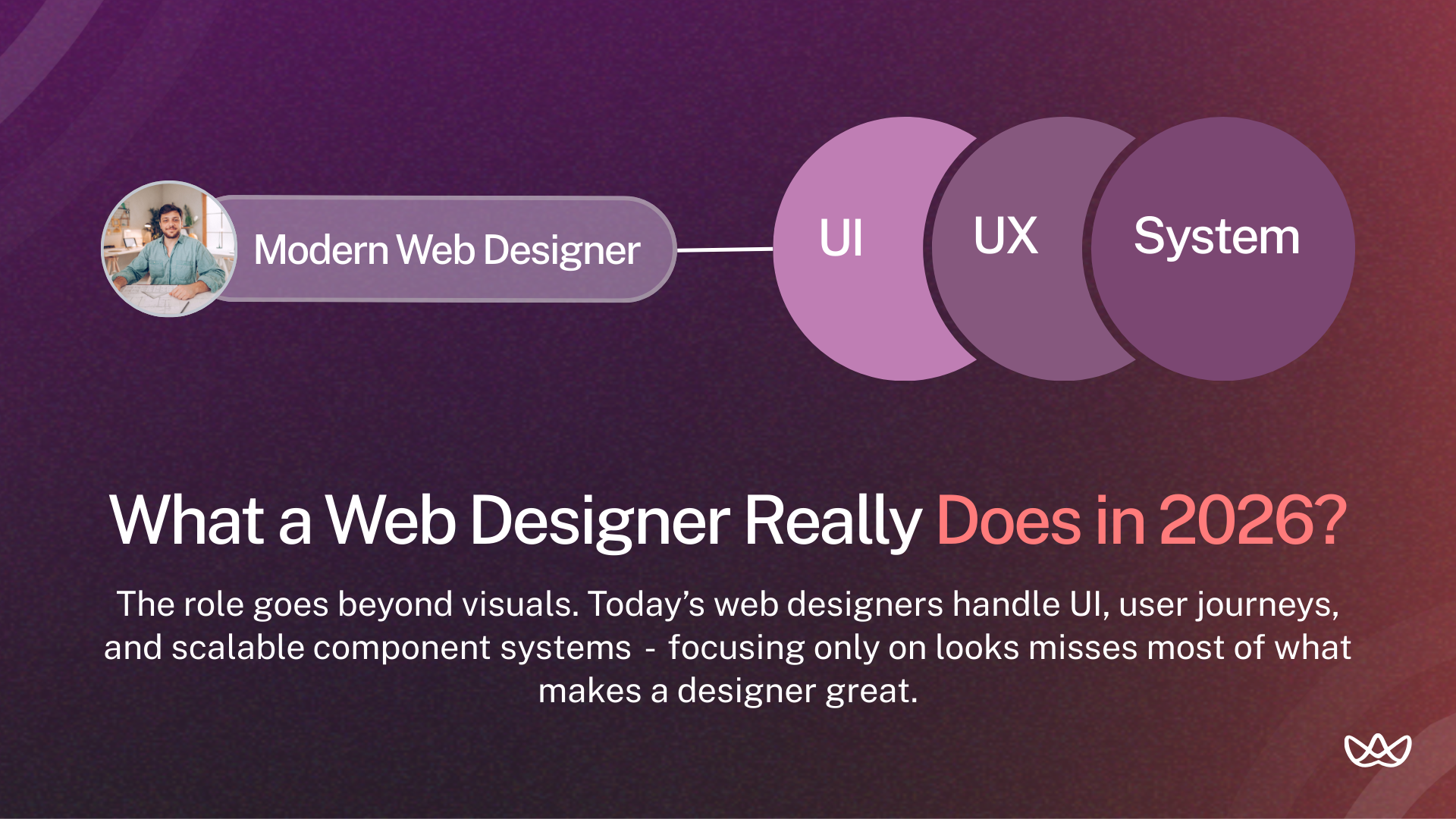
A modern web designer operates across three domains:
- UI (User Interface): The visual layer users see and interact with. Colors, typography, buttons, spacing, and imagery.
- UX (User Experience): How users navigate and accomplish goals. Flow logic, information architecture, and friction reduction.
- Systems Thinking: Creating reusable components and patterns that scale across pages and maintain consistency.
The role has evolved beyond making things look good. Today's web designers think strategically about business outcomes while executing visually.
UI vs UX: How Both Influence Conversions and User Flows
UI and UX work together but address different problems:
UI focuses on:
- Visual appeal and brand alignment.
- Button styles, color contrast, typography hierarchy.
- Micro-interactions and hover states.
- Consistency across pages.
UX focuses on:
- User journey from landing to conversion.
- Information hierarchy and content prioritization.
- Reducing friction in forms and checkout flows.
- Navigation logic and page structure.
A site can look polished but still confuse users if the UX isn’t clear. For teams in the US looking to scale design efficiently, it’s common to hire top UX/UI designers in LatAm, where designers often have experience delivering both strong UI and clear UX for conversion-focused projects.
What Does a Web Designer Actually Do Day-to-Day?
Typical daily activities include:
- Creating wireframes for new pages or features.
- Building high-fidelity mockups in Figma.
- Updating component libraries and design systems.
- Reviewing designs across responsive breakpoints.
- QA checking implemented designs against specs.
- Analyzing heatmaps and session recordings for UX issues.
- Iterating on pages based on conversion data.
- Collaborating with developers on implementation questions.
- Presenting design concepts to stakeholders.
The mix varies by company size and project phase. Early-stage startups need generalists who do everything. Larger teams have specialists focused on specific areas.
Web Designer vs Web Developer: What's the Real Difference?
The difference is between creative vision and technical construction. Web designers handle the front-facing experience, using tools like Figma and AI-driven prototyping to create layouts, branding, and interfaces.
Web developers build the underlying structure with code, turning those designs into functional, high-performance sites.
Designers focus on how a site looks and feels; developers focus on how it works and scales.
Some overlap exists. Designers who know HTML/CSS create more buildable designs. Developers with design sense make better implementation decisions.
Which Role Businesses Actually Need
Hire a designer when:
- You need new page layouts or visual redesigns.
- Conversion rates are stuck and UX might be the problem.
- Brand consistency is lacking across your site.
- You're launching new products and need landing pages.
Hire a developer when:
- Designs exist but need implementation.
- You need backend functionality (databases, APIs, logic).
- Performance optimization is the priority.
- You're building web applications, not marketing sites.
Hire both when:
- Starting from scratch on a new site.
- Running continuous product development.
- You need design and implementation capacity simultaneously.
Core Responsibilities That Matter for Businesses
A web designer’s job is to make a website work for users and the business. They map user journeys, keep branding consistent, and make sure the site is fast and accessible.
They also use AI and interactive features to create experiences that improve engagement and drive results.
1. Designing High-Conversion Layouts and User Journeys
Web designers map how visitors move from landing to conversion. They decide:
- What users see first (headline, hero image, value proposition).
- How attention flows down the page (visual hierarchy).
- Where CTAs appear and how prominent they are.
- What information users need before taking action.
- How to reduce friction at decision points.
Good layout design directly impacts lead quality. When users understand your offering before converting, they're more qualified.
2. Creating Brand-Aligned Visual Systems
Consistency builds trust. Web designers create systems that maintain brand identity across:
- Color palettes with primary, secondary, and accent colors.
- Typography scales with defined heading and body styles.
- Spacing systems for consistent padding and margins.
- Component libraries for buttons, cards, forms, and navigation.
- Icon sets and imagery guidelines.
These systems speed up future design work and ensure every page feels cohesive.
3. Responsive and Mobile-First Execution
Mobile traffic accounts for 50-70% of visits for most websites. Web designers build layouts that work across:
- Mobile phones (320px-480px)
- Tablets (768px-1024px)
- Laptops (1024px-1440px)
- Large displays (1440px+)
Mobile-first design starts with the smallest screen and expands. This forces prioritization of essential content and prevents cramming desktop layouts into phone screens.
4. Optimizing Readability, Accessibility and SEO Structure
Web designers impact SEO and accessibility through:
- Proper heading hierarchy (H1, H2, H3) for search engines
- Sufficient color contrast for readability (WCAG compliance)
- Alt text guidance for images
- Font sizes that work across devices
- Touch target sizing for mobile users
- Logical reading order for screen readers
Accessibility isn't optional. It expands your audience and increasingly factors into legal compliance.
5. Testing, Iteration and CRO-Driven Improvements
Design doesn't stop at launch. Web designers use data to improve:
- Heatmaps showing where users click and scroll.
- Session recordings revealing UX friction.
- A/B test results comparing design variations.
- Conversion funnel analytics identifying drop-off points.
- Form analytics showing field abandonment.
Data-driven designers make decisions based on evidence, not just opinions.
Examples of High-Impact Web Design Changes
Real improvements that move metrics:
- Moving CTA above the fold increased signups by 25%.
- Simplifying navigation from 8 items to 5 reduced bounce rate by 15%.
- Adding social proof near pricing increased conversions by 18%.
- Reducing form fields from 7 to 4 improved completion rate by 30%.
- Fixing mobile checkout flow recovered 20% of abandoned carts.
Small design changes can create significant business impact.
Business Impact of Great Web Design
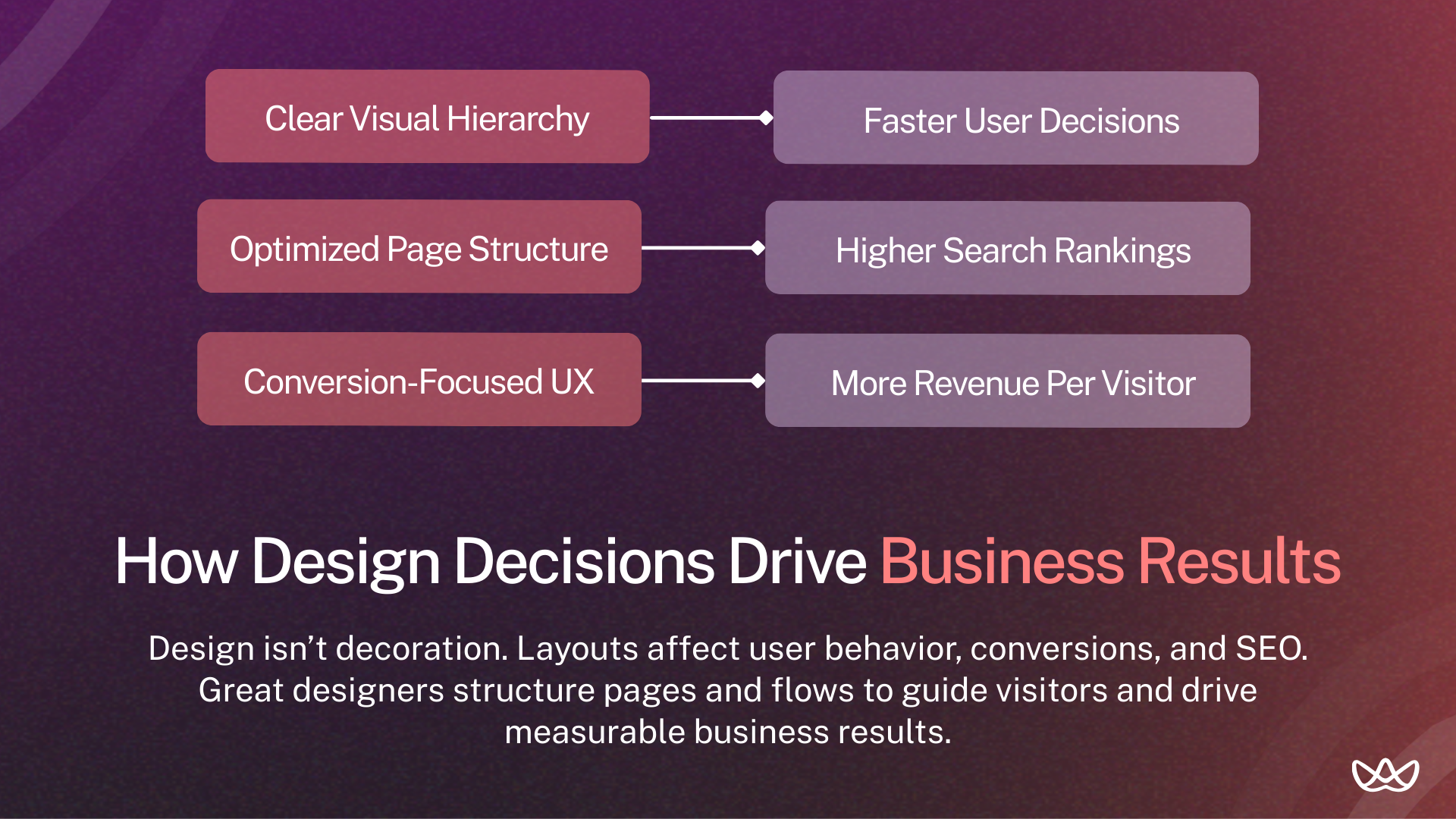
Great web design delivers measurable business results. Forrester reports that every $1 invested in user experience (UX) yields an average return of $100, representing a 9,900% ROI.
Optimized mobile sites drive higher conversions and engagement, and fast-loading pages convert three to five times more than slower ones. Design also establishes brand credibility, influences 75% of users, and reduces bounce rates.
Design quality correlates with business outcomes:
- First impressions form in 50 milliseconds based on visual design.
- 94% of first impressions relate to design elements.
- Well-designed sites see 200% higher conversion rates than poorly designed competitors.
- Users spend 5.94 seconds looking at a website's main image.
Impact on SEO Rankings & Site Speed
Google's Core Web Vitals directly connect design to rankings:
- LCP (Largest Contentful Paint): How fast main content loads. Design affects image sizes and layout complexity.
- CLS (Cumulative Layout Shift): Visual stability during loading. Design decisions cause or prevent shifts.
- FID (First Input Delay): Responsiveness to interaction. Complex animations affect this.
Designers who understand performance create layouts that load fast and rank higher.
Essential Skills of High-Performing Web Designers
High-performing web designers use technical, strategic, and human-focused skills. They work with AI-assisted tools like Figma, optimize performance and Core Web Vitals, and ensure accessibility and mobile-first design. They leverage data and technical SEO to guide UX decisions and collaborate closely with developers, explaining design choices in business terms.
Technical Skills: Figma, Webflow, and Prototyping
Must-have technical skills:
- Figma proficiency (components, auto-layout, prototyping).
- Responsive design principles and breakpoint logic.
- Understanding of HTML/CSS capabilities and constraints.
- CMS familiarity (WordPress, Webflow, Shopify).
- Prototyping for user testing and stakeholder demos.
- Asset optimization for web performance.
Designers don't need to code, but understanding code makes their designs buildable.
Design Skills: Wireframing, UI Systems, Component Libraries
Core design competencies:
- Wireframing to establish layout before visual design.
- Creating scalable component systems.
- Typography selection and hierarchy.
- Color theory and accessible palette creation.
- Layout composition and grid systems.
- Visual hierarchy and attention direction.
Soft Skills: Communication, Requirements Gathering and Feedback Loops
Design work requires constant communication:
- Translating business requirements into design solutions.
- Presenting concepts and explaining reasoning.
- Receiving feedback without defensiveness.
- Asking clarifying questions before starting work.
- Documenting design decisions for future reference.
Collaboration Skills: Working with Devs, Marketers & Product Teams
Web designers rarely work alone. They coordinate with:
- Developers (handoff, implementation questions, feasibility).
- Marketers (campaign requirements, brand guidelines, copy).
- Product managers (feature requirements, user research, priorities),
- Stakeholders (feedback, approvals, business context).
Collaboration skills often matter as much as design skills.
AI-Assisted Design Tools and Modern Trends
2026 designers increasingly use AI for:
- Generating initial layout concepts.
- Creating placeholder content and images.
- Automating repetitive tasks.
- Analyzing user behavior patterns.
- Accessibility checking.
AI augments but doesn't replace design thinking. Strategic decisions still require human judgment.
Tools Web Designers Use Daily
Designers rely on tools like Figma, Adobe XD, Sketch, and Framer to create and test layouts. Figma is the most widely used in 2026, with teams standardizing on it for collaboration and consistent design.
Workflow & Handoff Tools (Zeplin, DevMode, Notion, Jira)
- Figma Dev Mode: Built-in specs for developers.
- Zeplin: Design handoff with code snippets.
- Notion: Documentation and project briefs.
- Jira/Linear: Task tracking and sprint management.
- Slack: Daily communication and quick questions.
Analytics & Testing Tools (Hotjar, GA4, UX Testing Platforms)
- Hotjar: Heatmaps, session recordings, surveys.
- Google Analytics 4: Traffic and conversion tracking.
- Maze: Unmoderated usability testing.
- Optimal Workshop: Card sorting and tree testing.
Accessibility & Compliance Tools (WCAG, Contrast Checkers)
- Stark: Figma plugin for contrast and accessibility.
- axe: Browser extension for accessibility auditing.
- WAVE: Web accessibility evaluation tool.
- Contrast Checker: Color contrast verification.
Why Web Designers Matter for Growth & Performance
Great web design matters because users make up their minds almost instantly. 94 % of first impressions are based on design, and people form those opinions in about 50 milliseconds, less than the blink of an eye. Credibility also depends on design, with much of early trust tied to how a site looks and feels.
How Design Impacts Conversion Rates and Lead Quality
Design shapes the entire user journey:
- First impression determines if users stay or leave.
- Visual hierarchy guides attention to key messages.
- CTA design affects click-through rates.
- Form design impacts completion rates.
- Trust signals influence conversion decisions.
Poor design slows users down, while good design makes the experience feel seamless.
Design's Role in Customer Trust and Brand Perception
Users judge credibility based on design quality. A polished, professional site signals a legitimate business. A dated or broken site raises doubts regardless of your actual capabilities.
Brand perception forms before users read a single word. Design carries that weight.
How UX Reduces Development Costs and Speeds Up Builds
Investing in UX early helps teams build faster and avoid costly fixes. Clear specifications, reusable components, and tested prototypes reduce revisions and make development smoother.
What Top-Tier Web Designers Deliver
In 2026, top web designers deliver more than visuals - they build high-performance, conversion-focused sites. Their work combines UX/UI, personalization, speed, and SEO to drive results and trust.
1. Marketing-Ready Pages That Convert
- Landing pages optimized for specific campaigns
- Clear value propositions above the fold
- Strategic CTA placement based on user journey
- Social proof positioned at decision points
- Mobile experiences as polished as desktop
2. Developer-Friendly Designs That Reduce Revisions
- Organized Figma files with clear naming
- Component variants for different states
- Responsive breakpoints fully designed
- Specs that developers can inspect directly
- Realistic designs that respect technical constraints
3. Cross-Device Consistency and Accessibility Compliance
- Layouts tested across all screen sizes
- WCAG AA compliance as baseline
- Touch targets sized for mobile use
- Color contrast meeting accessibility standards
- Logical tab order for keyboard navigation
How to Evaluate a Web Designer (For Hiring Managers)
In 2026, hiring managers should focus on a designer’s business impact and technical skills, not just visuals. Look for measurable results, mobile-first and accessible designs, fast Core Web Vitals, and strong communication and AI-tool skills for cross-team work.
Portfolio Red Flags and What Good Work Looks Like
Good signs:
- Case studies with business context and outcomes
- Shipped work that went live (not just concepts)
- Mobile and responsive examples
- Explanation of constraints and decisions
- Variety showing adaptability
Red flags:
- Only concept work, nothing shipped
- Identical styling across every project
- No mobile examples
- Can't explain reasoning behind decisions
- No mention of business outcomes
How to Assess UX Thinking vs Pure Aesthetics
Ask candidates to walk through a portfolio project:
- Why did you place elements where you did?
- What user problems were you solving?
- How did business goals shape your decisions?
- What would you change based on post-launch data?
Strong candidates answer with specific reasoning. Weak candidates describe only visual choices.
Skills Assessments and Paid Trials
Portfolios show finished work. Trials reveal process:
- File organization and naming conventions
- Communication during the task
- Response to feedback
- Problem-solving approach
- Actual working speed
Pay for trials and evaluate both the process and the output.
Questions That Reveal Strategic Thinking
- How do you prioritize when stakeholders disagree?
- Walk me through a project where your first approach failed
- How do you decide what to test vs. ship directly?
- Describe handling a design that developers said was hard to build
Web Designer Evaluation Checklist
Check both what a designer delivers and how they work. Make sure they show clear thinking, solid skills, and can communicate their decisions effectively.
Career Path & Role Evolution in 2026
In 2026, web designers are moving from visual specialists to strategic architects, as AI handles routine tasks. New roles like UX Engineer and Design System Architect focus on adaptive, intelligent systems, integrating business goals with emerging tech like 3D design, voice interfaces, and ethical AI.
From Junior to Senior: What Changes
As designers progress from junior to lead, their focus shifts from execution to strategy, their autonomy increases, and the scope of work expands from single pages to department-wide systems.
Designer Career Tracks: Product, Marketing, Webflow, UX
Specialization paths include:
- Product Design: Apps and software interfaces
- Marketing Design: Landing pages, campaigns, conversion
- Webflow Development: Design + implementation combined
- UX Research: User testing and insights focus
- Design Systems: Component libraries and scale
How Remote and Nearshore Talent Is Changing the Market
Remote work normalized global hiring. LATAM designers specifically offer:
- Time zone alignment with U.S. (1-3 hour overlap)
- Comparable skills to U.S. designers
- 40-50% cost savings
- Strong English proficiency
Supply of quality LATAM designers has grown as design education improved across the region.
Where to Find High-Quality Web Designers
You can find high-quality web designers through pre-vetted LATAM talent networks like Floowi, freelance platforms such as Upwork, visual portfolio sites like Dribbble, professional networks like LinkedIn, and premium talent platforms like Toptal.
Floowi - Pre-Vetted LATAM Web Designers for Conversion-Focused Work
Floowi connects you with pre‑vetted web designers and other creative talent from Latin America, evaluated for technical skills, English proficiency, and cultural fit, so you only review qualified options.
Candidates typically integrate into your workflow in about 15 days, helping reduce hiring time and administrative burden.
Pre‑vetted platforms like Floowi make hiring faster and easier, while marketplaces and networks give more options but need extra screening.
Evaluating Web Designers for Business Impact
When evaluating designers, assess whether they understand business context:
- Do they ask about conversion goals?
- Can they connect design decisions to outcomes?
- Do they think beyond aesthetics to user goals?
- Have they worked in your industry or similar contexts?
Business-aware designers deliver more impact than pure visual artists.
Your Next Step
Great web designers don’t just make sites look good - they get how users think and what the business needs, guiding visitors, boosting conversions, and building trust. Working with vetted talent partners makes finding and hiring them simpler while keeping quality high.
Key Takeaways:
- Designs impact conversions and user flows.
- Role covers UI, UX, and scalable components.
- Core skills: Figma, responsive design, CRO.
- Business impact: higher conversions, better SEO, lower dev costs.
- Evaluate UX reasoning and delivered work, not just visuals.
- LATAM designers offer quality at 40–50% lower cost.
- Remote/nearshore hiring expands access to talent.
Start scaling your design capacity with Floowi and connect with pre-vetted LATAM web designers for high-conversion, modern web experiences - book your free consultation today.
Frequently Asked Questions
What does a web designer do for businesses?
Web designers create layouts and user experiences that turn visitors into customers. They handle visual design, UX flows, responsive execution, and iteration based on data. Their work directly impacts conversion rates and brand perception.
How do designers create high-conversion layouts?
Through strategic placement of elements: clear value propositions above the fold, visual hierarchy guiding attention to CTAs, friction reduction in forms, and social proof at decision points. Good designers test assumptions with data.
What's the impact of SEO-friendly structures on design?
Proper heading hierarchy, optimized images, and fast-loading layouts improve search rankings. Designers who understand Core Web Vitals create sites that rank higher and convert better.
What technical skills are non-negotiable for web designers today?
Figma proficiency, responsive design expertise, and understanding of at least one CMS platform. HTML/CSS awareness helps create buildable designs. Component-based thinking enables scalable systems.
How does Figma proficiency impact workflows?
Figma is the industry standard. Designers who master components, auto-layout, and Dev Mode create files developers can work from directly. Poor Figma skills slow down entire teams.
What portfolio red flags should hiring managers watch for?
Only concept work with no shipped projects, identical styling across every piece, missing mobile examples, and inability to explain design reasoning. These signal inexperience or poor process.
How do agencies assess UX thinking vs pure aesthetics?
By asking candidates to explain why they made specific decisions. Strong UX thinkers connect design choices to user goals and business outcomes. Pure visual designers describe only colors and typography.
How do paid trials validate design quality?
Trials reveal working process: file organization, communication patterns, feedback response, and problem-solving approach. Portfolios show polished finals; trials show how someone actually works.
What do web designers actually do day-to-day?
Wireframing, building mockups in Figma, updating design systems, checking responsive breakpoints, reviewing implemented work, analyzing user data, and collaborating with developers and stakeholders.


